Chapter 1. Getting Started — Try It, Sign Up, and Choose a Plan
Required Read this to follow this stage.In One Line: You can try ChatGPT right away without signing up. Sign up for free when you want to save your chats and upload files, and only consider a paid plan when the free plan feels too limited.
The screens shown here are from the web version (Plus plan) as of October 2026. Menu locations may look slightly different on the free plan or in the mobile app.
Try It Without Logging In
Go to the ChatGPT web address (chatgpt.com). Even without an account, you can type a question right into the center input box, "Ask ChatGPT (ChatGPT에게 물어보세요)."
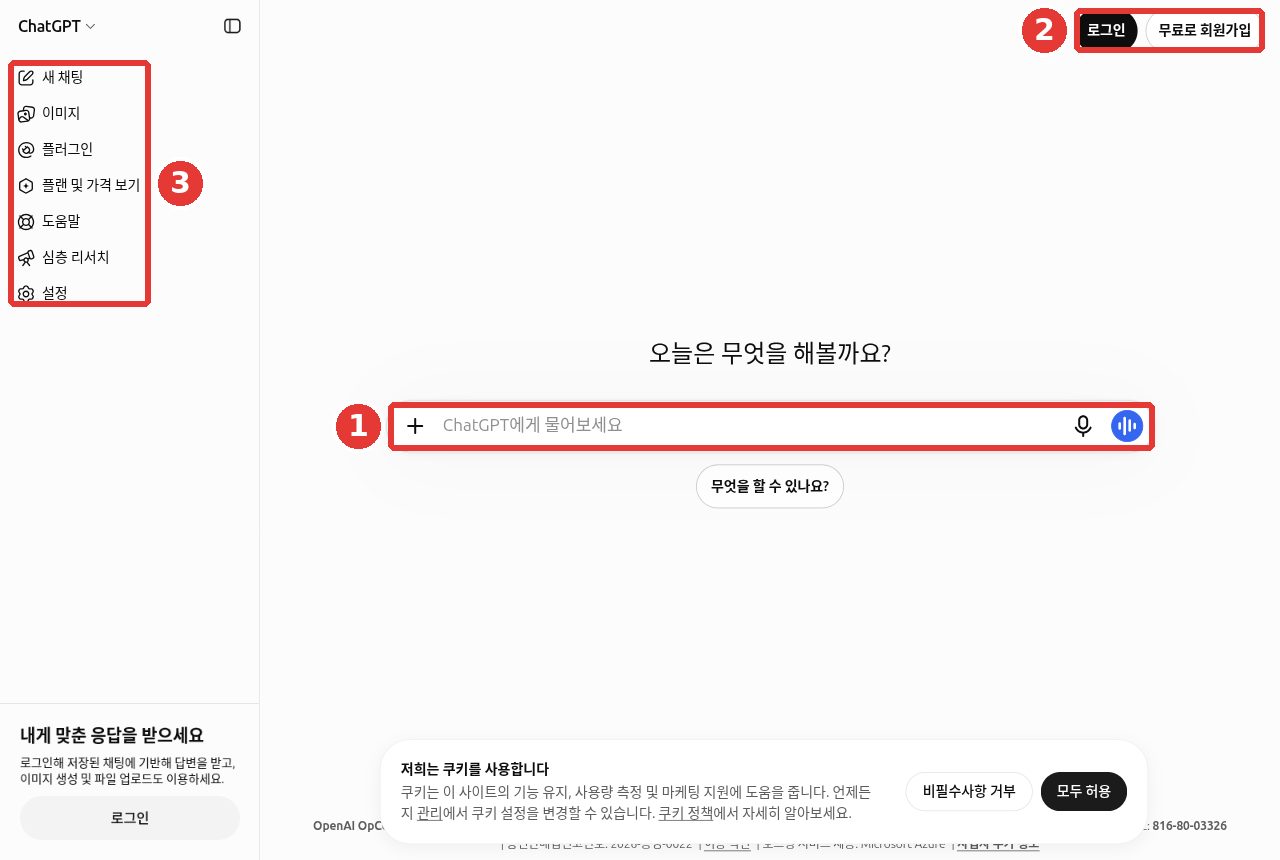
① Type your question right into the center input box, and ② use "Log in (로그인)" or "Sign up for free (무료로 회원가입)" at the top right to enter your account. ③ The left side menu has items like "New chat (새 채팅)" and "See plans and pricing (플랜 및 가격 보기)."
There are two limits when you use ChatGPT without logging in.[1]
- You can only have 1 conversation at a time.
- Your chat history is not saved. Once you close the window, you cannot find that conversation again.
South Korea is on the list of Supported Countries (countries where the service is officially available), so you do not need to worry.[2]
Try it without logging in first to see what it feels like. If you plan to keep using it, signing up is better. If this is your first time, try asking this:
What kind of work can you help me with? Give me just five examples that an office worker can use right away.What the reply looks like (example — click to expand) (click to expand)
This is a sample answer created for this guide. Actual replies vary depending on the service and when you ask.
Here are five things an office worker can use right away.
- Polishing emails: Paste a draft email and I will rewrite it more politely.
- Summarizing meeting notes: Turn long notes into a five-line summary and a to-do list.
- Outlining reports: Share your main points and I will build a table of contents for you.
- Asking for Excel formulas: Tell me what you want to calculate and I will tell you which formula to use.
- Brainstorming ideas: Get several options for event names or presentation orders.
Let me know if you want to try any of these.
Check if the answer worked well: Did it give you exactly five items? Can you try each one right away in your own work? If you like one, reply with its number and ask ChatGPT to do it next.
Quick check
Which statement is true when using ChatGPT without logging in?
Sign Up and Log In
If you are new, click "Sign up for free (무료로 회원가입)" at the top right (② in the image above). If you already have an account, click "Log in (로그인)." There are two ways to sign in.[3]
| Method | Description |
|---|---|
| Email and password | Create an account with your own email address |
| Social login (signing in with another company's account) | Sign in with your Google, Microsoft, or Apple account |
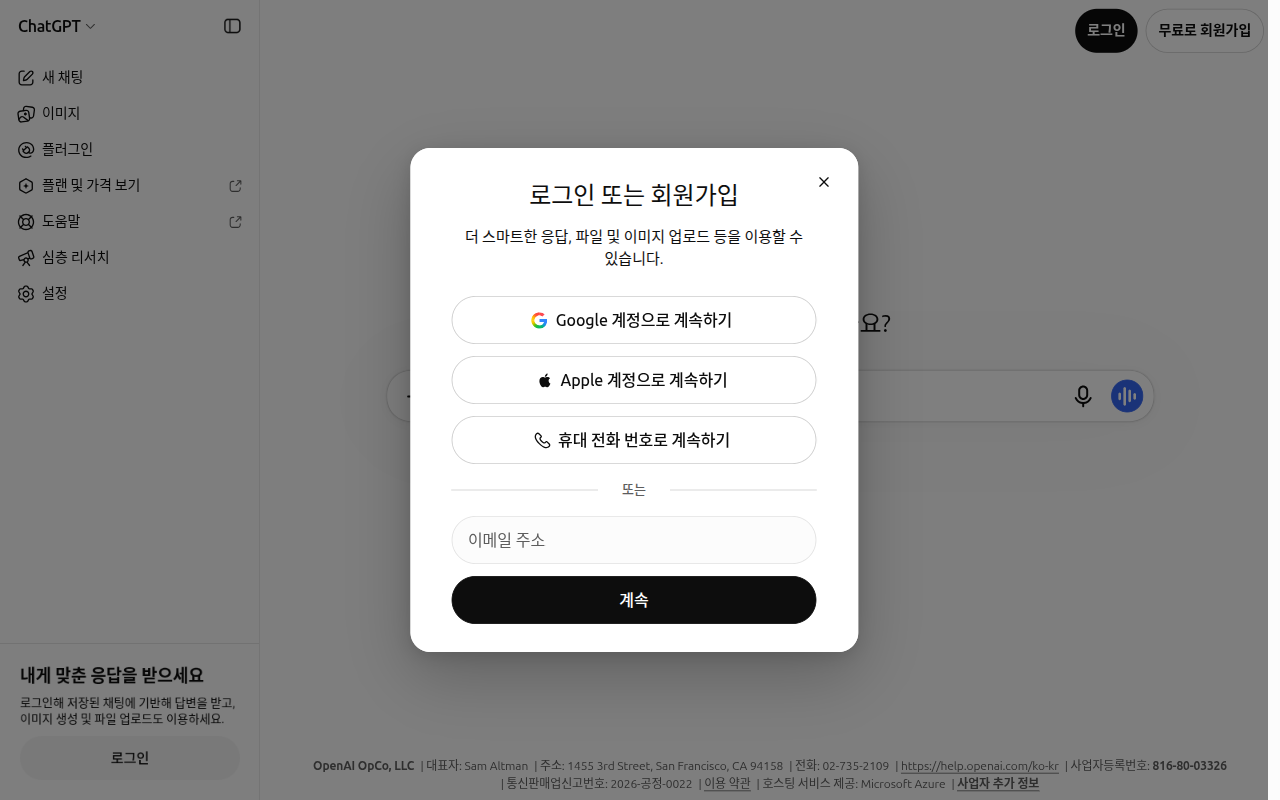
Web screen as of 2026-10-28. Instead of a Microsoft button, this window showed "Continue with phone (휴대 전화 번호로 계속하기)."[4]
There are three things to keep in mind.
- Same email means the same account. Even if you first signed up with an email address, logging in later with a Google account that uses the exact same email address takes you into the same account.[3:1]
- Be careful with Apple's "Hide My Email (이메일 가리기)." If you chose a private relay address that hides your real email when signing up with Apple, you can only return to that account using the same Apple ID. Logging in with your real email address will open a different new account.[3:2]
- Use a personal email for personal use. If you sign up with a work email, you may lose access to your account when you leave the company.[1:1]
When you think "My chats are gone" or "I paid for a subscription, why does it say Free?" (click to expand)
Accounts do not merge automatically. If you sign in with a different email and create a new account, your chat history and subscription stay separate. If you think "I paid for a subscription, why does it say Free?" or "My chats are gone," first check whether you logged in with the same account you used when signing up. The email address that receives billing receipts can also be different from your account email.[5]
Quick check
You signed up with Apple and chose "Hide My Email" to use a fake address. What should you watch out for later?
Plans at a Glance
ChatGPT offers several plans (요금제/플랜 — pricing tiers that give you different features and usage limits depending on how much you pay), from free to business tiers.[6]
| Plan | Who It Is For | Price in Korea (Monthly) |
|---|---|---|
| Free (무료) | First-time or occasional users | ₩0 |
| Go | People who often hit limits on the free plan | ₩13,000 |
| Plus | Daily users who need deeper, more thoughtful answers | ₩29,000 |
| Pro | Heavy users (split into 3 tiers) | From ₩159,000 |
| Business[7] · Enterprise · Edu | Companies, organizations, and schools | Separate pricing |
These prices are what appeared when opening the OpenAI pricing page in South Korea, and they change often. Always check the pricing page yourself before paying.[6:1]
What Changes Between Plans
It is easier to choose a plan when you focus on "what changes" rather than raw numbers.
| What Changes | Free (무료) | Paid |
|---|---|---|
| Text chats | Unlimited everyday text chats[8] | Higher limits across features |
| Ads | Ads may appear below answers on Free and Go | No ads on Plus and above |
| Choosing thinking depth | Turn on "Think (생각하기)" and it thinks longer | Plus and above pick the depth with "Reasoning effort (추론 수준)" |
| File uploads | Up to 3 files per day (Chapter 4) | Upload many more files |
| Work (mode for handing off long tasks) | Not available on web or mobile | Available (Chapter 7) |
"Think" is a button that makes ChatGPT think things through longer before answering. It can improve answers to hard questions. You will see where it is on screen in Chapter 2.
"Unlimited" on the Free plan applies only to everyday text chats. Safeguards against abuse still apply. Features like files, images, and voice have separate limits.[8:1]
If you are worried about ads, just know this. OpenAI states that ads do not affect ChatGPT's answers. Advertisers cannot see your conversations. Temporary Chats (chats that are not saved to history; see Chapter 3) do not show ads.[9]
Quick check
Which statement matches the official guide about ads in ChatGPT?
What to Know Before Upgrading to Paid
You do not need to start on a paid plan. Starting for free and upgrading only when you regularly hit limits is the safest approach. Make sure you know the three points below before paying.
- Deleting the app does not cancel your subscription. Removing the ChatGPT app from your phone does not stop billing. To stop paying, you must cancel the subscription yourself.[10]
- Cancel on the platform where you subscribed. If you paid on the web, cancel on the web; if you paid through the App Store or Google Play, cancel in that store. You cannot cancel inside the ChatGPT mobile app. Cancel at least 24 hours before your next billing date to avoid being charged for the next month.[11]
- Free trials turn into paid subscriptions automatically when they end. When a free trial or discount period from a referral or promotion ends, your saved payment method is charged automatically. Cancel before the period ends if you do not want to continue. Promo codes are single-use and cannot be stacked.[12]
More to know when paying (click to expand)
- Monthly billing only. Go, Plus, and Pro do not offer annual billing where you pay for a full year at once.[13]
- If your account still looks Free after paying, do not pay again. First check that you logged in with the exact account you used to pay. On the mobile app, go to Settings and tap Restore purchases. We could not confirm the Korean label for this menu item on screen.[14]
- Go does not include legacy models. Legacy models (older-generation AI models) are not included in Go, and voice chat has the same limits as the Free tier.[13:1]
There is also something called Credits (크레딧 — extra usage you buy in advance, separate from your plan). If you only have regular chats, you do not need credits. They are for when you want to use Work or Codex (OpenAI's coding assistant, covered in Stage 3) beyond your limit. Under Settings → "Usage (사용량)", a note says: "To keep using Work and Codex after reaching your usage limit, buy credits or turn on auto-recharge."[15]
Before buying credits (click to expand)
Buying credits does not change your plan. Credits expire 12 months from the purchase date. Except for cases like billing errors or unauthorized use, credits are generally non-refundable. If you turn on "Auto-recharge (자동 충전)", your default payment method is charged automatically whenever your balance drops below a set amount.[16]
If you are not sure which plan fits you, tell ChatGPT about your usage habits and ask. Just remember to verify actual prices and terms on the pricing page, not from the AI's answer (Stage 1, Chapter 9).
I use ChatGPT 3 to 4 times a day, mostly to polish work emails and summarize meeting notes.
Sometimes I also upload PDF files to summarize them. Give me three clear signs I can use
to judge for myself when it is time to move from the free plan to a paid plan.
Quick check
You deleted the ChatGPT app from your phone to stop using the Plus plan. What happens?
Mobile and Desktop Apps
Beyond a web browser, you can also use ChatGPT in a mobile app or a computer app. You do not need to create a new account for each device. Just log in with the same account. Check whether chats from your computer show up on your phone in step 4 of "Try It Yourself" below.
- Mobile app: Choose Chat or Work from the top dropdown (a menu that opens when you tap it).[17]
- Computer app: One new app combines Chat, Work, and Codex in a single place.[18][19]
- KakaoTalk: In South Korea, you can also use ChatGPT right inside KakaoTalk (explained below).[20]
In the mobile app, look for features like Images in the horizontal bar above your chat list.[21] Screens change often. If button locations differ from the web screens in this guide, look for buttons with similar names.
When downloading the mobile app, search for "ChatGPT" in the app store and check the developer name. On iPhone (App Store), it should say "OpenAI OpCo, LLC"; on Android (Google Play), it should say "OpenAI." Many look-alike apps have similar names.[22]
ChatGPT for Kakao is a service built jointly by Kakao and OpenAI. It works only in South Korea. There is no separate app to install. Tap "ChatGPT" at the top of the "Chats (채팅)" tab in KakaoTalk to start. It appears in the latest version of KakaoTalk registered with a Korean phone number.[23]
If you already have a ChatGPT account, link it. You will be able to see your KakaoTalk chat history inside ChatGPT as well. If you do not have an account, you can sign up with your Kakao account. An account created in KakaoTalk works in the regular ChatGPT app too.
Terms to know when using it in KakaoTalk (click to expand)
From OpenAI's perspective, this is a third-party service (a service operated together with another company). Be sure to read both OpenAI's and Kakao's terms and privacy notices.[23:1]
Quick check
Which statement is true when using the mobile app or desktop app?
What to Try First When Something Goes Wrong
Sometimes a reply freezes, an error message pops up, or a "verify you are human" puzzle keeps appearing. Try the steps below in order. They summarize OpenAI's official troubleshooting guide for beginners.[24]
- Check if the service is down first. If an outage is listed on status.openai.com (OpenAI's service status page), you just need to wait. ChatGPT also slows down naturally during busy hours.[25]
- Wait 30 to 60 seconds. Sometimes a reply simply takes longer to finish. If it stays frozen and your conversation is very long, ask again in a New chat.
- Open an incognito window (시크릿 창 — a browser window that opens without browsing history or extensions). You can also try a different browser.
- Turn off your VPN (a program that changes your internet address) for a moment. Seeing a "verify you are human" puzzle (CAPTCHA) once in a while is normal. If it appears every time, a VPN or browser extension may be the cause.[26]
- If it only fails on your company Wi-Fi, switch to mobile data on your phone. If it works there, the issue is with your company network. Ask your IT team.[27]
- If a message says you hit a limit or shows a time when you can use it again, wait until that time. You can also switch to another available feature.[28]
Uninstalling and reinstalling the app does not reset your usage limits.[29] If nothing works, contact support at help.openai.com. Copy and send the exact error message. If you attach a screenshot, make sure no passwords or personal information are visible.
Quick check
ChatGPT stopped answering and keeps showing a "verify you are human" puzzle. What is a good first step?
Try It Yourself
- Go to chatgpt.com without logging in and ask, "What kind of work can you help me with?"
- Close the browser completely, open it again, and check if that conversation is still there (chats before logging in can be seen only in the browser window you have open now. If it is gone after closing, that is normal).[1:2]
- Sign up with your personal email, ask the same question again, and check if the conversation appears under "Recents (최근)" in the left side menu.
- Install the app on your phone, log in with the same account, and check that the conversation from your computer appears there too.
Ongoing project (Preparing a Book Club Meeting): While logged in, ask: "I organize a neighborhood book club. Make me a checklist of things to prepare for next month's meeting." Save the list so you can compare it with what you actually do after finishing the project.
Summary
- You can use ChatGPT without logging in, but only one chat at a time, and your history is not saved.
- Sign up with an email address or a Google, Microsoft, or Apple account. Matching email addresses share the same account.
- Plans differ in ads, thinking depth options, file upload limits, and access to Work. Check current prices on the pricing page.
- Deleting the app does not cancel a subscription. To stop billing, cancel on the platform where you subscribed (web, App Store, or Google Play) at least 24 hours before your billing date. Free trials also auto-renew into paid plans when they end.
- Check the developer name before downloading the mobile app ("OpenAI OpCo, LLC" on the App Store, "OpenAI" on Google Play). ChatGPT in KakaoTalk works only in South Korea.
- When something goes wrong, try these in order: check service status → wait or start a new chat → open an incognito window → turn off VPN → try another network.
Glossary
| Term | One-line meaning |
|---|---|
| Supported Country | A country where the service is officially provided |
| Social Login | Signing in with an account from another company, such as Google or Apple |
| Plan | A pricing tier with different features and usage limits depending on what you pay |
| Subscription | A recurring agreement that bills you automatically every month |
| Legacy Model | An older-generation AI model kept available after newer models come out |
| Temporary Chat | A conversation that is not saved to your history (Chapter 3) |
| Credit | Extra usage you buy separately to keep using features like Work after reaching your plan limit |
| CAPTCHA | A simple puzzle shown to verify that you are a human |
| Incognito Window | A browser window opened without browsing history or extensions |
| VPN | A program that changes your internet address so you appear to connect from somewhere else |
Finished this chapter?
Progress is saved only in this browser. See your progress on the full table of contents.
Next chapter: Chapter 2. Touring the Screen
References (29)
OpenAI Help Center, "The ChatGPT home page". "ChatGPT can be used without an account in supported countries" / "only have one conversation at a time" / "Chats will remain accessible only for the current session on the same browser." / "For personal use, we recommend an account with an email address you personally own". help.openai.com (checked on 2026-10-23) ↩︎
OpenAI Help Center, "ChatGPT Supported Countries". Lists "South Korea". help.openai.com (checked on 2026-10-23) ↩︎
OpenAI Help Center, "Changing your account sign-in method". "log in using a social login method (Google, Microsoft, or Apple) as long as the email address matches" / "using your personal email… will open a different account". help.openai.com (checked on 2026-10-23) ↩︎
Verified directly in a new logged-out browser window. Buttons show "Continue with Google (Google 계정으로 계속하기)", "Continue with Apple (Apple 계정으로 계속하기)", and "Continue with phone (휴대 전화 번호로 계속하기)", with an "Email address (이메일 주소)" field and "Continue (계속)" below (checked on 2026-10-28, web logged-out screen) ↩︎
OpenAI Help Center, "Why can't I log in to ChatGPT?". "OpenAI doesn't automatically merge accounts" / "This may be different from the email address where you receive invoices or receipts." help.openai.com (checked on 2026-10-24) ↩︎
OpenAI, "Plans and Pricing (플랜 및 가격)" (viewed from South Korea). "₩13,000 /월", "₩29,000 /월", "From ₩159,000 /월". Displayed currency varies by country. openai.com (checked on 2026-10-23) ↩︎
Business is the new name for the company plan formerly called "Team," renamed on August 29, 2025. OpenAI Help Center, "ChatGPT Business overview". "ChatGPT Team was renamed to ChatGPT Business on August 29, 2025." help.openai.com (checked on 2026-10-23) ↩︎
OpenAI Help Center, "ChatGPT Free Tier FAQ". "Free users have unlimited everyday text chats, subject to abuse-prevention safeguards." help.openai.com (checked on 2026-10-24) ↩︎
Ad testing started in the United States in February 2026 and is expanding to select countries. We could not confirm from the official guide whether ads appear in South Korea yet. OpenAI Help Center, "Ads in ChatGPT". "Ads may appear for users on the Free and Go plans." / "Ads do not influence ChatGPT's answers." / "Temporary Chats will not show ads." / "Ad testing started in the United States on February 9, 2026." help.openai.com (checked on 2026-10-23) ↩︎
OpenAI Help Center, "About ChatGPT Pro tiers". "Uninstalling the ChatGPT app does not cancel your subscription." help.openai.com (checked on 2026-10-23) ↩︎
OpenAI Help Center, "ChatGPT Plus promotions and referrals". "you must cancel from the same platform where you started the subscription" / "You can’t cancel through the ChatGPT mobile app." / "Cancel at least 24 hours before your renewal date to avoid an unwanted charge." help.openai.com (checked on 2026-10-24) ↩︎
OpenAI Help Center, "ChatGPT Promotional Subscriptions/Free Trial Invites FAQ". "ChatGPT will automatically renew as a paid subscription at the end of the initial free trial or promotional subscription period" / "Referral or promo codes are single‑use and cannot be stacked." help.openai.com (checked on 2026-10-24) ↩︎
OpenAI Help Center, "What is ChatGPT Go?". "we do not support annual billing… for ChatGPT Go, Plus, or Pro" / "Access to legacy models is not included" / "Voice mode is included with the same usage limits as the Free tier." help.openai.com (checked on 2026-10-23) ↩︎
OpenAI Help Center, "What is ChatGPT Plus?". "On the iOS or Android app, go to Settings > Restore purchases to sync your subscription." Could not confirm the Korean menu name on screen. help.openai.com (checked on 2026-10-24) ↩︎
Verified directly on ChatGPT web Settings → "Usage (사용량)" screen (Plus plan, Korean UI). "Credits (크레딧)" and "Auto-recharge (자동 충전)" items (checked on 2026-10-24) ↩︎
OpenAI Help Center, "Credits (Personal plans)". "Credits are valid for 12 months from purchase." / "Credits are non-refundable unless required by law or contract, or an approved exception applies." / "Unused credits may qualify for a refund for a verified billing error, confirmed unauthorized activity" / "you can turn it on from Settings > Usage". help.openai.com (checked on 2026-10-24) ↩︎
OpenAI Help Center, "ChatGPT Work and Codex". "On mobile: Select Chat or Work from the dropdown." help.openai.com (checked on 2026-10-23) ↩︎
The older computer app may still remain under the name "ChatGPT Classic." OpenAI Help Center, "Moving to the new ChatGPT desktop app". "ChatGPT Classic: The previous ChatGPT desktop app." help.openai.com (checked on 2026-10-23) ↩︎
The Mac app requires macOS 14 or later. OpenAI Help Center, "Downloading the ChatGPT macOS app". "The ChatGPT macOS app requires macOS 14". help.openai.com (checked on 2026-10-24) ↩︎
OpenAI Help Center, "ChatGPT release notes", 2026-07-13 entry. "ChatGPT is also available on Kakao in South Korea". help.openai.com (checked on 2026-10-23) ↩︎
In March 2026, the mobile app simplified its side menu, and features like Images moved into this horizontal bar. It may have changed again since then. OpenAI Help Center, "ChatGPT release notes", 2026-03-26 entry. "now appear in a horizontal bar above your chats and projects". help.openai.com (checked on 2026-10-23) ↩︎
OpenAI Help Center, "ChatGPT iOS and Android app FAQ". "Check that the developer is OpenAI OpCo, LLC." / "Check that the publisher is OpenAI." help.openai.com (checked on 2026-10-24) ↩︎
OpenAI Help Center, "ChatGPT for Kakao: Overview and Kakao Tools". "ChatGPT for Kakao is only available in Korea." / "There is no separate app to install." / "the latest version of the KakaoTalk Korea app if it’s registered with a Korean phone number" / "ChatGPT for Kakao is a third-party service" / "Review both sets of terms and privacy notices". help.openai.com (checked on 2026-10-24) ↩︎
OpenAI Help Center, "Troubleshooting ChatGPT Error Messages". "Check status.openai.com for known outages" / "Wait 30–60 seconds to see if the response completes" / "Start a new chat if the conversation is long or has many turns" / "Use an incognito or private browsing window" / "Disable VPNs or proxy connections". help.openai.com (checked on 2026-10-24) ↩︎
OpenAI Help Center, "Why is my ChatGPT taking so long to respond?". "ChatGPT users during peak hours may notice a pattern of slowness at specific times of the day." help.openai.com (checked on 2026-10-24) ↩︎
OpenAI Help Center, "CAPTCHAs in ChatGPT". "While encountering CAPTCHAs occasionally is normal, you shouldn't constantly encounter them." help.openai.com (checked on 2026-10-24) ↩︎
OpenAI Help Center, "Network recommendations for ChatGPT errors on web and apps". "Company WiFi network vs Cellular hotspot". help.openai.com (checked on 2026-10-24) ↩︎
OpenAI Help Center, "Troubleshooting model feature access". "If it says you reached a limit or shows a reset time, wait until that time and try again, or choose another available option." help.openai.com (checked on 2026-10-24) ↩︎
OpenAI Help Center, "Troubleshooting the ChatGPT mobile app". "Reinstalling doesn't reset usage limits, change workspace permissions, or remove account restrictions." help.openai.com (checked on 2026-10-24) ↩︎