Chapter 1. Getting Started — Where to Use It, Signing Up, Plans, and Usage Limits
Required Read this to follow this stage.One-line summary: You use Claude with the same account on the web, the desktop app, and the mobile app. Signing up takes an email address (or a Google or Apple account) and a text-message phone verification. Start on the Free plan and only consider a paid plan if you often run into limits.
The screens shown here are from the web version as of October 2026, on the Free plan. On the mobile app or desktop app, some menus may be in slightly different places.
What Claude Is and Where You Use It
Claude is an LLM (large language model; see Stage 1, Chapter 1) made by a company called Anthropic.[1] Everything you learned in Stage 1 about how to ask good questions works the same way in Claude. This chapter only covers how to get into the Claude service itself.
There are three places you can use it. Whichever you use, you share a single account.
| Where | How to open | What you need |
|---|---|---|
| Web | claude.ai in a browser | An internet browser |
| Desktop app | Download from the download page | macOS 13 or higher, Windows 10 or higher |
| Mobile app | Download from the app store | iOS 18 or higher, Android 8.0 or higher |
Source: Anthropic Help Center[1:1][2][3][4]
If this is your first time, start on the web. There is nothing to install, so it is the easiest way in.
You need to meet two requirements to use Claude.[1:2]
- You must be in a supported location (a country where the service is officially offered). South Korea is on the list of supported locations.[5]
- You must be at least 18 years old.
When downloading the mobile app, search your app store for "Claude by Anthropic".[3:1][4:1]
Once you are in for the first time, try asking this:
What kinds of things can you help me with? Give me just five examples an office worker can use right away.If installing the app is not going smoothly (click to expand)
- The desktop app is also available on Linux (a type of computer operating system) in beta (a testing stage before the official release).[2:1]
- On the iPhone App Store, you will also see a work version called "Claude for Intune". Unless your company specifically told you to use that one, download "Claude by Anthropic".[3:2]
- If the app does not show up in search, your region, device, or OS version may not be supported.[4:2]
- If a new feature does not appear in your app, try updating the app manually in the app store.[6]
Quick check
Your high school nibling wants to use Claude for homework and asks for help signing up. What should you check first?
Signing Up and Logging In
Go to claude.ai and enter your email address. Then click "Continue with email" (이메일로 계속하기). If you have a Google or Apple account, you can also click "Continue with Google" (Google로 계속하기) or "Continue with Apple" (Apple로 계속하기).[7][8]
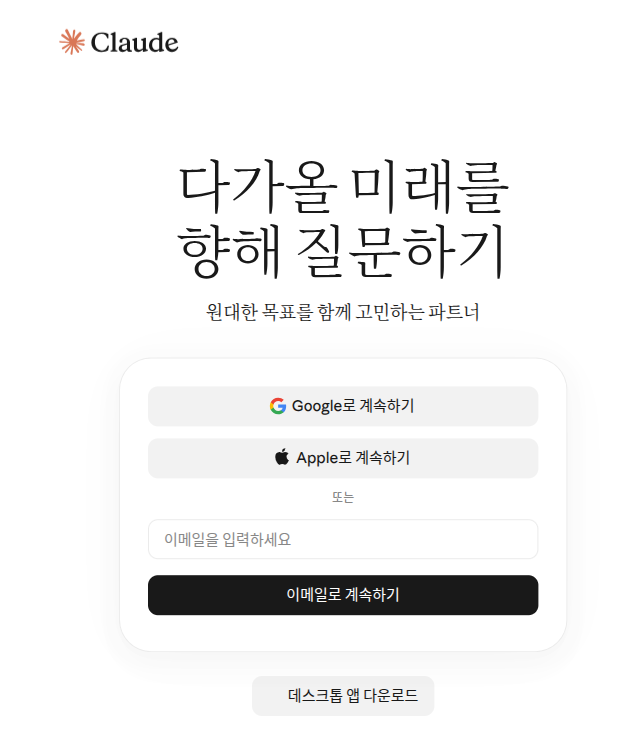
Claude does not use a password. You cannot create a dedicated password for your Claude account.[9] When you sign in with email, you get an email titled "Secure link to log in to Claude.ai" (Claude.ai에 로그인하기 위한 보안 링크). Click the link inside that email and you are logged in.[9:1] You do not have to remember a password, which is convenient. In return, you must be able to open that email account.
Keep three things in mind.[9:2]
- If you open the link on a different device, you will get a code. For example, say you requested the login on your computer and opened the email on your phone. Your phone will show a verification code. Enter that code on the computer where you first requested the login.
- If the email does not arrive, check your spam folder. Look for an email from @mail.anthropic.com.
- Use the same email on every device. You have to log in with the email address you normally use to open the same account.
Quick check
You are trying to log in to Claude with your email, but there is no password field. What should you do?
Phone Number Text Verification
When you sign up for the first time, you go through phone number verification. Enter a phone number from a supported location and you will get a 6-digit code by text message.[10] You cannot skip this step. Every new user goes through it.[10:1]
Be sure to check these two points before you enter your number.[10:2]
- Once a phone number is verified, you cannot change it later. So verify with your own number that you plan to keep for a long time. If you verify with a borrowed number, there is no way to change it later.
- Only a regular mobile phone number works. Internet phone (VoIP) numbers, Google Voice, numbers created by an app, and home phones (landlines) do not work.
If the text does not arrive after 5 minutes, click "Try again" (다시 시도).[10:3]
If you are creating several accounts (click to expand)
One phone number can verify up to 3 accounts.[10:4]
Quick check
During sign-up, you are asked for phone verification by text. You are thinking of borrowing a family member's phone for a moment. What is the best move?
Plans at a Glance
Claude offers several plans (pricing tiers that give you different features and usage amounts depending on what you pay), from free to business plans.[11]
| Plan | Who it is for | Price (per month, US dollars) |
|---|---|---|
| Free | First-time users | $0 |
| Pro | Daily users | $20 (about $17/month when billed annually) |
| Max | Heavy users | 5x $100 · 20x $200 |
| Team · Enterprise | Teams and companies | Separate pricing |
Source: Anthropic pricing page and Help Center[11:1][12][13]
These prices are in US dollars and do not include tax.[11:2] In your country, prices may be shown in your local currency, and taxes vary by country.[12:1] If you subscribe through the mobile app, the price may differ from the web price.[13:1] We could not verify the Korean won prices shown in Korea for this guide. Check the pricing page yourself before paying.
What Changes Across Plans
It is easier to choose when you focus on what changes, rather than on the numbers.
| What changes | Free | Paid (Pro · Max) |
|---|---|---|
| Usage amount | Basic | Pro gives at least 5x more than Free[11:3] |
| Web search & creating files | Included[11:4] | Included |
| Research (long research reports) | Not included | Included (Chapter 6)[11:5] |
| Larger model (Opus) | Not selectable | Selectable (Chapter 2)[11:6] |
| Cowork (handing off whole tasks) | Not included | Included (Chapter 8)[2:2] |
Here is what the unfamiliar words in the table mean. You do not need to remember them all now. Later chapters cover them one by one.
- Usage amount: How much you can use Claude over a set period of time. The "Usage Limits" section below covers this in detail.
- Research: A feature where Claude spends a long time finding and reading many web pages, then organizes them into a long research report.
- Opus: The larger model among Claude's several models (the AI that produces the answers). You will see how to choose a model in Chapter 2.
- Cowork: A feature that goes beyond asking and answering in chat. You hand Claude a whole task made up of several steps.
You can see for yourself what is included in the Free plan under Settings → "Billing" (결제).
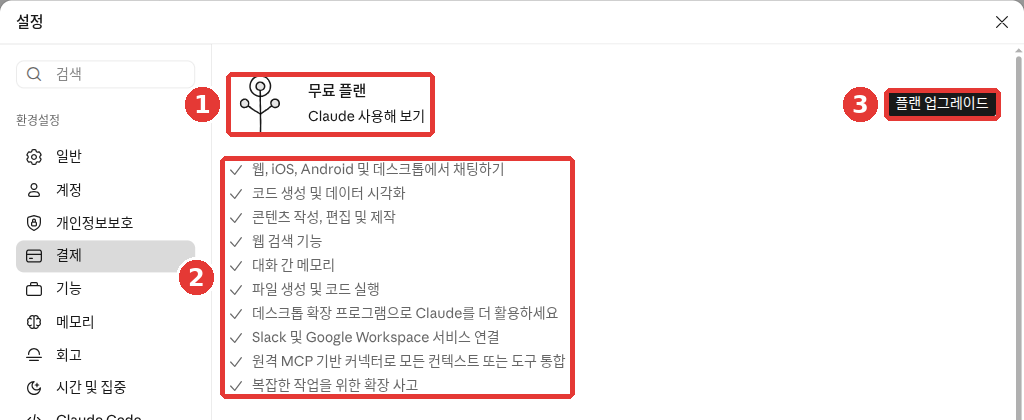
This is the web screen for the Free plan. The red numbers match the numbered list below.
- ① Current plan: "Free plan" (무료 플랜)
- ② Included in the Free plan: chat on web, iOS, Android, and desktop; code generation and data visualization; writing and editing; web search; memory across conversations; file creation and code execution; desktop extensions; Slack and Google Workspace connections; connectors (a feature that links other services; see Chapter 7); and extended thinking for complex tasks[14]
- ③ "Upgrade plan" (플랜 업그레이드): button to switch to a paid plan (see "What to Know Before Switching to a Paid Plan" below)
It is fine if the names in ② look unfamiliar. Here are just the ones you will use often:
- Memory across conversations: A feature that remembers what you told Claude in past conversations and keeps it for the next one (Chapter 5)
- File creation and code execution: A feature where Claude creates files such as Excel or Word files directly and lets you download them (Chapter 4)
- Extended thinking: A feature that makes Claude think longer before answering (Chapter 2)
The rest will be explained in the chapter where you need them.
Consider a paid plan only when you need a feature that is not on this list. That way, you do not pay for features you will never use.
Max gives you 5 times (5x) or 20 times (20x) the usage of Pro. You can get longer answers and try new features early.[11:7]
Billing periods also differ. With Pro, you choose between monthly and annual billing. Max is monthly billing only.[13:2] Aside from the annual billing discount, there is no standard ongoing discount for Pro or Max. Occasionally there are limited-time promotions.[12:2]
Quick check
After trying Claude for free, you are wondering whether to upgrade to a paid plan. What is worth doing first?
Usage Limits — 5-Hour, Weekly, and Length
Claude has no fixed message count like "X messages per day." How much you can use depends on the length and complexity of your conversations, the model you choose, and the features you use.[11:8] For example, uploading a long file and asking for a summary uses more than a few short questions.
Instead, there are three kinds of limits.
| Limit | What it means | Who it applies to |
|---|---|---|
| Session limit | Usage allowance that refills every 5 hours | All plans |
| Weekly limit | Usage allowance that refills once a week | Paid plans |
| Length limit | How much fits into a single conversation | All plans |
Source: Anthropic Help Center[1:3][15]
Session Limit and Weekly Limit
The session limit and weekly limit are buckets that measure how much you have used. Your weekly limit refills on a fixed day and time assigned to your account.[12:3] What you use across the web, desktop app, and mobile app is counted together from the same bucket. Switching to your phone does not give you a separate limit.[15:1][11:9]
Here is what happens as you get close to a limit.
- You see a warning such as "Approaching session limit" (세션 제한에 접근 중) or "Approaching weekly limit" (주간 제한에 접근 중).[16]
- Once you hit the limit, a message tells you the time when you can use Claude again.[16:1]
- You can either wait until that time or upgrade your plan.[15:2]
For example, say you hit the limit in the morning after polishing a long report many times. Once the time shown has passed, you can use Claude again. On paid plans, you can see progress bars showing how much you have used under Settings → "Usage" (사용량).[17][18]
Length Limit
The length limit is how much Claude can handle in a single conversation. It is the same thing as the context window you learned about in Stage 1.[15:3] If you see a message starting with "Your message will exceed the length limit for this chat" (메시지가 이 채팅의 길이 제한을 초과합니다), attach fewer or smaller files, or start a new conversation.[16:2]
When a conversation gets very long, Claude sometimes automatically summarizes the earlier part to keep going. When that happens, you see a notice saying "Organizing thoughts" (생각을 정리 중).[15:4] Long conversations like this use up more of your usage limit. When you change topics, it is better to open a new conversation.[15:5]
Tips to Save Your Usage Limit
Here are a few tips to save your usage limit.[17:1]
- Group related questions into a single message. Asking once uses less than splitting the same thing across three messages.
- Read your message once more before sending. You will need fewer follow-up questions.
- Put reference materials you use often into a Project (Chapter 7). A Project is a workspace that gathers the materials and conversations you use for one piece of work. Reusing materials stored in a Project counts less against your limits.
For example, instead of sending three separate questions, bundle them like this:
Please answer these three things at once.
1. Summarize these meeting notes in five lines.
2. Put the action items and owners into a table.
3. Write a short follow-up email draft to send to attendees.
(Paste meeting notes here)
The answer you get will look roughly like this (example — click to expand) (click to expand)
This is an example created for this guide. Actual answers vary by service and from run to run.
1. Five-line summary
- Set the date for next month's event to Month ○, Day ○.
- Decided to hold the event at (venue from the notes).
- Kept the budget the same as last time.
- Assigned owners for booking the venue and writing the notice.
- Scheduled the next meeting for Month ○, Day ○.
2. Action items and owners
Action item Owner Book venue (Name from the notes) Write notice (Name from the notes) 3. Follow-up email draft Subject: Summary of Month ○, Day ○ meeting Hello, here is a summary of the event details and action items we decided on in today's meeting. Please prepare your assigned items before our next meeting.
Check whether you got a good answer: Did all three answers come back in numbered order? Is the summary really five lines? Do the action items and owners in the table match the meeting notes? Did it make up anything that was not in the notes? Is the email draft short enough to send to attendees right away?
Quick check
You use Claude every day for your shop and keep hitting the usage limit. What is a good first step?
What to Know Before Switching to a Paid Plan
You do not need to start on a paid plan. Starting on Free and upgrading only when you regularly hit the limit is the safest approach.
Here is how to switch to a paid plan on the web:[7:1]
- Click your name (or initials) at the bottom left and select "Settings" (설정).
- Go to "Billing" (결제) and click "Upgrade plan" (플랜 업그레이드) (③ in the Billing screenshot above).[14:1][19]
- Choose between monthly and annual billing, enter your payment details, and click "Subscribe" (구독).
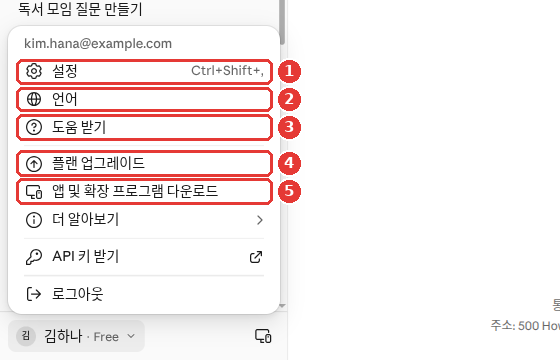
The name and email in this screenshot have been replaced with examples (Free plan). In the account menu, you can see ④ "Upgrade plan" (플랜 업그레이드) right next to ① "Settings" (설정).[14:2] Whichever path you take, read the price and terms once more before you pay.
In the mobile app, tap your initials at the top right and select "Upgrade to Pro" (Pro로 업그레이드). Payment goes through the app store (in-app purchase).[20][21]
Make sure you know the points below before you pay.
- Subscriptions renew automatically. By default, your plan renews automatically at the end of each billing period.[7:2]
- Cancel where you signed up. If you subscribed on the web or desktop app, click the "Cancel" (취소) button under Settings → "Billing" (결제).[19:1] If you subscribed in the mobile app, go to your initials in the app → "Billing" (청구) → "Manage subscription" (구독 관리). In that case, Apple or Google handles the billing.[22]
- Cancel at least 24 hours before your billing date. That prevents the next charge from going through. Your cancellation takes effect at the end of your current billing period.[22:1]
- Deleting the app does not stop your subscription. Removing the app from your phone does not automatically cancel your subscription.[3:3]
- Your conversations stay even if you cancel. Your chats, projects, and files remain as they are, and your account switches to the Free plan when the billing period ends.[11:10]
- Payments are generally non-refundable. Exceptions apply only when stated in the Terms of Service or required by local law.[11:11]
Common billing questions (click to expand)
- Web subscriptions only accept credit or debit cards.[23]
- You cannot change your billing date directly. If you want a different billing date, you have to cancel and subscribe again on the day you want.[23:1]
- If you paid but your account still shows Free, do not pay again. First check whether you logged in with a different email address. Also check whether the payment failed.[23:2]
- Receipts can be viewed under Settings → "Billing" (결제), and they are also sent by email. Search your inbox for "Your receipt from Anthropic".[23:3]
If you are not sure which plan fits you, tell Claude your usage habits and ask. Just remember to verify prices and terms on the pricing page, not from the AI's answer (Stage 1, Chapter 9).
I use Claude 3 to 4 times a day, mostly to polish work emails and summarize meeting notes.
Sometimes I upload PDF files to summarize them too. Give me three criteria I can use
to judge for myself when it is time to move from Free to a paid plan.
Quick check
You subscribed to Pro in the mobile app and want to stop using it. What is the right way to cancel?
What to Try First When Something Goes Wrong
Sometimes answers do not come back, an error message pops up, or you cannot log in. Try the steps below in order.
- A message saying "Due to unexpected capacity constraints…" (예상치 못한 용량 제약으로 인해…) is not an outage. It means a lot of people are using the service right now and it is crowded. Try again after a few minutes. Traffic spikes like this do not show up on the status page.[16:3]
- To check for a real outage, visit status.claude.com (Anthropic's service status page).[16:4]
- If you get a login error, turn off your VPN (a program that changes your internet address) and browser extensions. Clearing your browser cache and cookies (temporary records left behind by websites you visit) also helps.[16:5]
- If the login email does not arrive, look for @mail.anthropic.com in your spam folder.[9:3]
If it still does not work, contact customer support. There is no phone support; everything is handled in writing.[24]
- If you are logged in, click your name (or initials) at the bottom left → "Get help" (도움 받기) (③ in the account menu screenshot above).[14:3] A chat starts with Fin (Anthropic's AI support bot). Chatting with Fin does not use up your Claude usage limit.[24:1]
- If you cannot log in at all, click the message icon at the bottom right of the Help Center (support.claude.com) and select "I can't login" (로그인할 수 없습니다).[24:2]
- If you are on a paid plan (Pro or Max), a human support team member follows up on issues Fin could not solve. On the Free plan, support mostly covers help articles and Fin.[24:3]
- Do not open a second ticket for the same issue. Just reply to the original conversation. Replies come to both the support messenger and your account email, so it is fine to close the window.[24:4]
When sending a screenshot, make sure no other personal information is visible.
Quick check
You see the message "Due to unexpected capacity constraints…" What should you do?
Try It Yourself
- Go to claude.ai, sign up with your email, and click the link in the login email to sign in. If the email does not arrive, check your spam folder.
- Complete the text-message phone verification. Double-check that it is a phone number you plan to keep for a long time.
- Ask, "What kinds of things can you help me with?"
- Install the "Claude by Anthropic" app on your phone, log in with the same email, and check that the conversation from your computer shows up.
Ongoing project (Preparing a Book Club Meeting): Ask, "I'm the organizer of a neighborhood book club. Make me a checklist of things to prepare for next month's meeting." Save the list and compare it against what you actually did once you finish the project.
Summary
- You use Claude with the same account on the web (claude.ai), desktop app, and mobile app. You must be at least 18 and in a supported location (including South Korea).
- You sign up and log in with an email address or a Google or Apple account. Instead of a password, you receive an email with a login link.
- When signing up for the first time, you complete text-message phone verification. Once verified, your phone number cannot be changed.
- Individual plans are Free, Pro, and Max. Prices are in US dollars before tax, so check the pricing page.
- There are three limits: a 5-hour session limit, a weekly limit (paid plans), and a length limit per conversation. There is no fixed message count.
- Subscriptions renew automatically. Cancel where you signed up at least 24 hours before your billing date. Deleting the app does not cancel your subscription.
- A "capacity constraints" message means heavy traffic. Check status.claude.com for real outages. Support starts with Fin under "Get help" (도움 받기) in the account menu.
Key Terms
| Term | One-line meaning |
|---|---|
| Supported Location | A country or region where the service is officially offered |
| Beta | A testing stage before the official release |
| Plan | A pricing tier with different features and usage amounts depending on what you pay |
| Subscription | An agreement that bills automatically every month or every year |
| Session Limit | Usage allowance that refills every 5 hours |
| Weekly Limit | Usage allowance on paid plans that refills once a week |
| Length Limit | How much fits into a single conversation; related to the context window |
| VoIP | Internet phone service; cannot be used for text verification |
| Fin | Anthropic customer support's AI bot |
Finished this chapter?
Progress is saved only in this browser. See your progress on the full table of contents.
Next chapter: Chapter 2. A Tour of the Screen
References (24)
Anthropic Help Center, "Get started with Claude". "Claude is a large language model (LLM) built by Anthropic." / "Web: Visit claude.ai to chat with Claude in a web browser." / "You must be in one of our supported locations to access Claude." / "You must be at least 18 years old to use our services." / "there is a session-based usage limit that will reset every five hours." support.claude.com (checked on 2026-10-26) ↩︎
Anthropic Help Center, "Install Claude Desktop". "Claude Desktop is available on macOS, Windows, and Linux (beta)." / "macOS: macOS 13 (Ventura) or higher" / "Claude Cowork is available for all paid plans (Pro, Max, Team, Enterprise)" support.claude.com (checked on 2026-10-26) ↩︎
Anthropic Help Center, "Install Claude for iOS". "You can install the Claude app onto your iOS device by navigating to the App Store and searching for “Claude by Anthropic”" / "If your organization hasn't asked you to use Claude for Intune, install Claude by Anthropic." / "We currently support iOS version 18.0 and above, and iPadOS 18.0 and above." / "your subscription will not be automatically canceled." support.claude.com (checked on 2026-10-26) ↩︎
Anthropic Help Center, "Install Claude for Android". "We currently support Android 8.0 Oreo and above." / "you may be located in an unsupported region, using an unsupported device, or using an unsupported version of Android." support.claude.com (checked on 2026-10-26) ↩︎
Anthropic Help Center, "Where can I access Claude?". Includes "South Korea" in the list of supported locations. support.claude.com (checked on 2026-10-26) ↩︎
Anthropic Help Center, "How to update Claude for iOS". "you may need to update your mobile app manually" support.claude.com (checked on 2026-10-26) ↩︎
Anthropic Help Center, "How do I sign up for the Pro plan?". "Enter your email address and click “Continue with email” or click “Continue with Google” if applicable." / "Navigate to Settings > Billing and click the “Upgrade plan” button." / "Choose between monthly and annual billing periods." / "your subscription will be set to automatically renew at the end of each billing period (monthly or annual) by default." support.claude.com (checked on 2026-10-26) ↩︎
Verified directly on claude.ai/login in a logged-out browser window. The buttons shown are "Continue with Google" (Google로 계속하기), "Continue with Apple" (Apple로 계속하기), and "Continue with email" (이메일로 계속하기). Although the help article mentions only two login options (email and Google), the Apple button was also present on this screen (checked on 2026-10-28, pre-login web screen) ↩︎
Anthropic Help Center, "Log in to your Claude account". "you will see two different options for logging in to your Claude account." / "This will send you an email with the subject line “Secure link to log in to Claude.ai” and a login link." / "You should enter this code on the original device where you requested the login email to authenticate." / "It’s not possible to create a dedicated password for your Claude account at this time." / "enter the same email address you use to log in on your usual device." / "Check your spam and junk folders for emails from @mail.anthropic.com." support.claude.com (checked on 2026-10-26) ↩︎
Anthropic Help Center, "Verify your phone number". "you’ll be asked to enter your phone number from a supported location to receive a verification code via text message." / "We’ll send a six-digit verification code to your phone number via text message." / "you cannot use VoIP numbers, Google Voice, phone numbers created using apps, landlines" / "We require phone verification for all new users, and there isn’t a way to skip this step." / "if it has been more than five minutes, click "Try again" to reset the modal" / "We only allow a maximum of three Claude accounts to be verified with the same phone number." / "There isn’t a way to change your phone number associated with your Claude account once it has been verified." support.claude.com (checked on 2026-10-26) ↩︎
Anthropic pricing page. "Per month with annual subscription discount ( $200 billed up front). $20 if billed monthly." / "Prices shown don’t include applicable tax." / "Search the web, create files, and run code" / "Pro gives you at least 5x more usage per 5-hour session than Free." / "Higher output limits for all tasks" / "How much you can do depends on the length and complexity of your conversations, the model you choose, and the features you use, so there's no fixed message count." / "Your activity across Claude on web, desktop, mobile, and Claude Code all draws from the same pool." / "Canceling doesn't delete your data. Your chats, projects, and files stay with your account" / "For Pro and Max, your account moves to the Free plan once the period ends." / "Payments are generally non-refundable, except where our Consumer Terms of Service say otherwise or where local law requires it." In the comparison table, the Research row and Opus row are not included in Free and start from Pro. claude.com (checked on 2026-10-26) ↩︎
Anthropic Help Center, "What is the Pro plan?". "The Pro plan is available for $20 per month (US), with pricing in your local currency where supported." / "Annual subscriptions are billed once yearly at a discounted rate." / "We don’t offer standard discounted pricing for individual plans (Pro and Max)." / "Weekly limits reset at a fixed time each week that is assigned to your account." support.claude.com (checked on 2026-10-26) ↩︎
Anthropic Help Center, "What is the Max plan?". "Max 5x: $100 per month" / "These prices are for web subscriptions only. Mobile pricing may vary depending on your app platform." / "The Max plan is currently available as a monthly subscription only." support.claude.com (checked on 2026-10-26) ↩︎
Verified directly on the Claude web interface (Free plan, Korean UI): the "무료 플랜 · Claude 사용해 보기" feature list and "플랜 업그레이드" under Settings → "결제", and "설정", "언어", "도움 받기", and "플랜 업그레이드" in the account menu. (checked on 2026-10-26) ↩︎
Anthropic Help Center, "How do usage and length limits work?". "Paid plans have two types of usage limits: a session limit that resets every five hours, and weekly limits that reset once every week." / "your usage of all different Claude product surfaces (claude.ai, Claude Code, Claude Desktop) counts towards the same usage limit." / "If you hit your session limit or weekly limit, you can wait for it to reset or upgrade your plan." / "Length limits relate to Claude's context window—the amount of information Claude can work with in a single chat." / "Claude summarizes earlier messages to continue the conversation seamlessly." / "Longer conversations that trigger automatic context management consume more of your usage limit." support.claude.com (checked on 2026-10-26) ↩︎
Anthropic Help Center, "Troubleshoot Claude error messages". "“Approaching session limit” or "Approaching weekly limit."" / "you’ll see an error message letting you know when you can use Claude again" / "Try attaching fewer or smaller files or starting a new conversation." / "Ensure you’re not using a VPN when accessing Claude." / "The system is functioning normally but managing high demand across all users." / "Capacity issues will not appear on our status page" / "To check for confirmed incidents, visit status.claude.com" support.claude.com (checked on 2026-10-26) ↩︎
Anthropic Help Center, "Usage limit best practices". "you can navigate to Settings > Usage to view progress bars showing how much of your five-hour session and weekly usage limits you’ve consumed." / "If you have multiple related tasks or questions, group them in a single message." / "Content in projects is cached and counts less against your limits when reused." support.claude.com (checked on 2026-10-26) ↩︎
Some Korean help articles label this "사용" instead of "사용량". ↩︎
The Korean UI says "결제", while the English Help Center calls it "Billing" (청구). ↩︎
Anthropic Help Center, "How do I sign up for Claude Pro on the Claude app for iOS?". "click on your initials in the upper right corner" / "From your settings page, click on “Upgrade to Pro” and follow the payment instructions to complete your in-app purchase." support.claude.com (checked on 2026-10-26) ↩︎
Anthropic Help Center, "How do I sign up for Claude Pro on Claude for Android?". "To sign up for Claude Pro using the Claude app for Android, open the app on your device and click on your initials in the upper right corner." support.claude.com (checked on 2026-10-26) ↩︎
Anthropic Help Center, "Cancel your Pro or Max subscription". "Your cancellation will take effect at the end of your current billing period" / "cancel your subscription at least 24 hours before your next billing date." / "Navigate to Settings > Billing and click the “Cancel” button." / "Select “Manage subscription” and follow the prompts for cancellation." support.claude.com (checked on 2026-10-26) ↩︎
Anthropic Help Center, "Paid plan billing FAQs". "For subscriptions purchased on the web, we only accept credit or debit cards." / "search by the subject line "Your receipt from Anthropic."" / "there isn't a direct way to change your subscription billing date." / "You've logged in with a different email." support.claude.com (checked on 2026-10-26) ↩︎
Anthropic Help Center, "How to get support". "Support is provided in writing through the support messenger and email. We don't offer phone support." / "Click your initials or name in the lower left corner and select “Get help” from the menu." / "Chatting with Fin will not impact Claude usage or spend limits." / "Further assistance from our Product Support team" / "Select "I can't login."" / "Opening a second request for the same problem creates a duplicate that has to be re-triaged" / "Replies are delivered to the messenger and to your account email, so you won't miss one." support.claude.com (checked on 2026-10-26) ↩︎