第4章 文件与创作 — 上传文件、Canvas、图片·视频·音乐
选读 需要的时候再读。跳过也能跟上后面的章节。一句话总结:通过输入框的「+」,你可以上传文件来拿到摘要和分析,在 Canvas 里一起修改文档和应用, 还能生成图片、视频、音乐。用 Gemini 做出的媒体里会带有“由 AI 生成”的标记。别人分享的应用里,不要填入密码。
界面以2026年10月的网页版为准,图片是付费套餐(Google AI Pro)的韩语界面。这一章的功能里,像生成视频这样需要有付费套餐才能用的,都标注了「付费」。
上传文件
上传文档、表格文件、照片、视频这类文件,就可以根据它们的内容得到回答。可以请它做摘要、问你好奇的地方、或者交办分析。[1] 点输入框的「+」,选择「上传文件(파일 업로드)」。Google Drive 里的文件,通过「从 Drive 添加文件(Drive에서 파일 추가)」导入(第2章)。[1:1][2]
文件一次最多可以上传10个。一般只是几个文档或照片的话,不用在意上限。[1:2]
能上传的量(点击展开)
| 项目 | 上限 |
|---|---|
| 一次上传的文件数 | 最多10个(视情况而异) |
| 单个视频 | 最多2GB |
| 其他单个文件 | 最多100MB |
| 视频总时长 | 5分钟(Pro·Ultra 为1小时) |
| 音频总时长 | 10分钟(Pro·Ultra 为3小时) |
上传文件夹时,文件夹里的文件也会一个个计数。出处:Google 帮助中心[1:3]
要导入 Drive 里的文件,有两样东西需要事先打开。[1:4]
- 「保留活动记录(활동 기록 보관)」(把我的对话保存在账号里的设置,第3章)
- Google Workspace(Gmail、Drive 这类 Google 应用的组合)与 Gemini 的连接(第7章)
如果还没连接,也可以先把 Drive 文件下载到自己的电脑,再用「上传文件」上传。
上传表格文件,还可以生成图表。 在网页上上传表格文件后,请它生成图表试试。做出的图表可以放大查看,并改成你想要的样子。[1:5]
请用上传的家庭记账文件,把这个月的支出按项目画成柱状图。
花得最多的三个项目,请各用一句话单独点出来。有三点需要注意。[1:6]
- 大文件可能会漏掉一部分。 想要更好的结果,请把它拆成内容少的小文件再上传。一次能读的量,请看第1章的套餐表。
- 文件分析另有按小时计算的上限。 上传太多碰到上限时,请等到过一段时间重新解除。
- 上传的文件会占用 Gemini 应用的存储空间。 这个空间和 Drive 容量分开计算。
存储空间满了的时候(点击展开)
如果弹出「要上传文件,请先删除数据(파일을 업로드하려면 데이터를 삭제하세요)」,就说明空间满了。在「设置(설정)」→「活动(활동)」里清除以前的活动,空间就会腾出来。含有视频、照片的对话占用的空间更多。[1:7]
上传文件之前,请先看一遍那个文件里有没有别人的个人信息(第1阶段第9章)。
理解检查
你把很厚的报告 PDF 整个上传并得到了总结,但后半部分内容好像漏掉了。先试什么办法?
Canvas — 一起修改文档和应用
Canvas(画布)是把文档或应用单独放进一个窗口,和 Gemini 一起修改的功能。可以做文档、应用、幻灯片、代码。[3] 点输入框「+」→「更多工具(도구 더보기)」→「Canvas」,写下你想做的东西并发送(第2章)。[3:1][2:1]
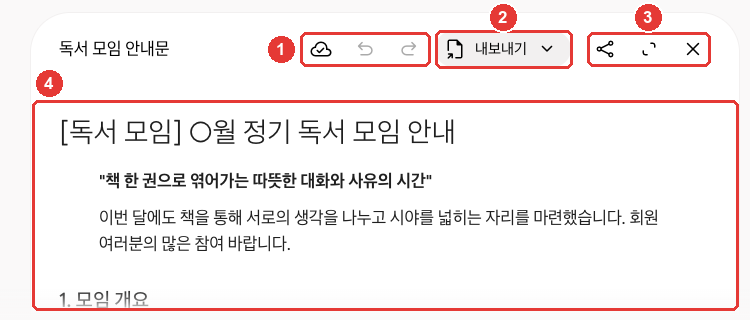
这是练习时做的通知。在本指南确认的界面上,文档窗口是在对话里打开的。点 ③ 的「全屏(전체 화면)」可以放大查看。[2:2]
| 编号 | 按钮 | 作用 |
|---|---|---|
| ① | 「更改已保存(변경사항이 저장됨)」·「上一版本(이전 버전)」·「下一版本(다음 버전)」图标 | 查看保存状态,在前后版本之间切换 |
| ② | 「导出(내보내기)」 | 导出到 Docs 等外部 |
| ③ | 「分享(공유)」·「全屏(전체 화면)」·「关闭(닫기)」图标 | 生成链接、放大查看、关闭 |
| ④ | 文档正文 | 直接修改,或选中一部分请 Gemini 修改 |
图标名称是把鼠标移上去后弹出的名称。出处:在 Gemini 网页界面上亲自确认[2:3]
第一次打开时,会弹出“点击任意位置即可直接输入和修改,或选中文字请 Gemini 做出更改。(아무 곳이나 클릭하여 직접 입력하고 수정하거나, 텍스트를 선택하여 Gemini에게 변경을 요청하세요.)”的提示。[2:4] ④ 正文你可以直接修改,也可以选出要改的部分交给 Gemini。
像幻灯片这样需要特定格式时,就在问题里这么写。[3:2] 比如可以这样请求。
请帮我做一份下个月读书会的通知。要包含日期、地点、要读的书、需要准备的东西,
并写成一页的文档。
在 Canvas 里能做的事如下。[3:3]
- 改动的内容会自动保存。 用上一版本、下一版本按钮,可以重新查看之前保存的样子。
- 可以只改一部分。 用鼠标拖选要改的部分,再写下要改什么。
- 文档可以直接改长度和语气。 点「调整长度(길이 변경)」·「调整语气(어조 변경)」就行。
- 可以转换成别的形式。 用做好的文档,可以生成幻灯片、测验、信息图(把信息整理成图画的一页资料)、网页、音频概览(把文档变成对话形式的语音来听)等。目前未满18周岁的人不能使用这个功能。
- 可以导出到外部。 可以导出到 Docs,幻灯片可以导出为 Google Slides 或 PDF。
做应用时,可以在 Canvas 右上角直接查看和修改代码(让应用运转的指令)。点「显示控制台(콘솔 표시)」,还能看到应用运行时留下的错误记录。[3:4] 一开始不懂也没关系。要改的地方,用说话的方式请 Gemini 改就行。 要给应用加入生成文字、图片这类 AI 功能,必须是已登录且满18周岁以上的人。[3:5]
用 Canvas 做出的东西,会随那个对话一起被删除(第3章)。要长期使用的文档,请导出到 Docs 里。
理解检查
想让 Canvas 做的通知里,其他地方不动,只把第二段改短。最合适的办法是什么?
分享 Canvas 应用时和收到时
用 Canvas 做的应用也可以生成分享链接。这时比分享对话要更小心。 即使你自己不做应用,也可能有人发来一个 Canvas 应用,说“请用这个链接报名”。所以收到时的注意事项也要了解。
由多人共享数据的应用,任何拿到链接的人都可以查看并修改这个应用的数据。[3:6][4] 做出有保存功能的应用时,Gemini 会一并创建数据库(存放资料的地方)。 多人共享数据的应用,会保存在公开的数据库里。所以任何有链接的人都可以查看和修改。[4:1] 比如,你做了一个收集聚会成员联系方式的应用,并把链接传出去,收到链接的任何人都能看到那些联系方式。收集个人信息的应用,请不要分享。
对别人发来的应用,要像对待陌生邮件一样保持怀疑。 你填进应用的信息,应用的创建者能看到,拿着链接的其他人也可能看到。Google 这样提醒。[4:2]
- 对要你填写密码或付款信息的应用,要格外小心。
- 要求相机、麦克风权限的应用,也要小心。
- 不要下载来自不可信来源的应用。
- 看起来危险的应用,可以通过页面下方的链接举报。
收到别人分享的 Canvas 链接,只能在网页(gemini.google.com)上打开,在手机 App 里打不开。[3:7]
理解检查
你打开了陌生人发来的 Canvas 应用链接,页面上写着“请输入密码以登录”。该怎么办?
生成图片
用文字描述,Gemini 就会为你画图。画图的模型是 Nano Banana(纳米香蕉)。[5] 点输入框「+」→「生成图片(이미지 만들기)」,或者在侧边菜单「图片(이미지)」里选模板(预先准备好的框架),也可以直接写下描述。[5:1][2:5]
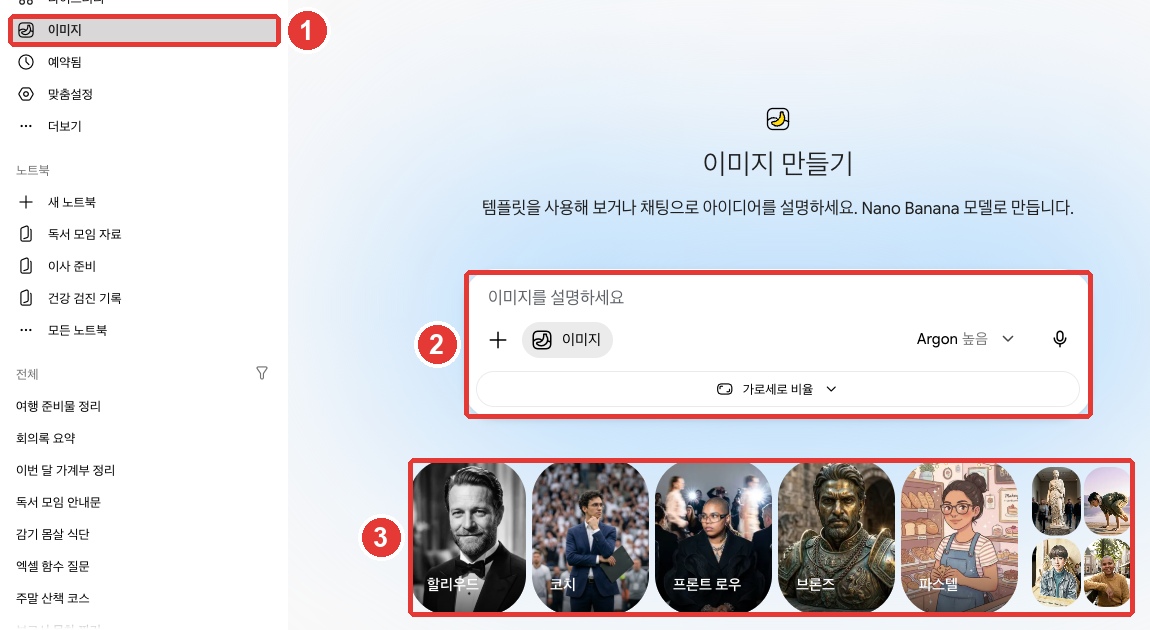
① 点侧边菜单「图片(이미지)」后,可以在 ② 输入框里描述图画,或者选 ③ 模板开始。输入框下面的「长宽比(가로세로 비율)」用来选图画的形状(横向和纵向长度的比例)。[2:6]
请它画好的要点如下。[5:2]
- 用“画”“做”这类说明要做什么的词开头。
- 把画风(像照片、水彩、漫画等)、什么东西在哪里做什么,写得详细一点。
| 不够好的请求 | 更好的请求 |
|---|---|
| “猫的画” | “请用水彩的感觉,画一只在窗边打瞌睡的橘色猫。画成午后阳光照进来的场景。” |
更好的请求把画风、主角、地点、氛围都告诉了它,所以需要请它重画的情况就少了。
做好的图可以通过对话来修改。 在侧边菜单「资料库(라이브러리)」里打开图画,点下面的「聊天(채팅)」,写下要改的地方。也可以上传我的照片来修改,或者把几张合在一起生成新图。[5:3]
只生成图画,要满13周岁以上;要连修改也做,则必须满18周岁以上。[5:4][6]
因套餐而不同的地方(点击展开)
理解检查
你只说了“猫的画”,结果出来的不是想要的画。哪种请求更好?
生成视频·音乐
生成视频(付费)
用 Gemini Omni(Gemini 全能)像聊天一样生成和修改视频。可以混合文字、图片、视频来描述。[7] 个人账号必须有 Google AI 套餐才能用。[7:1] 点输入框「+」→「生成视频(동영상 만들기)」,写下你想要的视频。[7:2][2:7] 和生成图画一样,写清楚什么东西在哪里做什么就行。比如,试着这样写:“帮我做一个小狗在海边追着球跑的视频”。
生成时需要知道的几点如下。
- 可以上传参考资料。 最多可以上传1个视频和5张照片。[7:3]
- 生成要花几分钟。 生成期间那个对话不能用,所以请新开一个聊天去做别的事,再回来。[7:4]
- 通过对话来修改。 可以请它删除或替换物体,改变相机角度或场景。[7:5]
- 默认是横屏。 上传参考照片或视频的话,会沿用它们的比例。[7:6]
- 做好的视频可以发布到 YouTube 或下载。[7:7]
上传的照片,只用我有权使用的。 违反条款或侵犯他人权利,账号可能会被终止。[7:8]
生成音乐
用 Lyria(莉莉娅)描述一首曲子,它就会生成音乐和歌词。[8] 请点输入框「+」→「生成音乐(음악 만들기)」。[8:1][2:8]
- 必须满18周岁以上,并且「保留活动记录(활동 기록 보관)」是开着的。[8:2]
- 长度可以在**短版(约1分钟)或完整版(约2~3分钟)**中选择,也可以选是否有歌声和曲风。[8:3]
- 要生成完整长度的曲子,必须把模型换成 Pro(第2章)。[8:4]
- 曲子可以下载成带封面图的视频(MP4)或只有声音的文件(MP3)。[8:5]
- 能生成的曲子数量有上限。超过时会有通知。[8:6]
音乐也最好用“写”“作曲”开头,并写上曲风和乐器。[8:7]
请作一首读书会开始时播放的轻柔曲子。用原声吉他和钢琴,
不要歌词,做得短一点。生成图片、音乐、视频会消耗很多用量。视频消耗得最多(第1章)。
理解检查
用免费账号使用 Gemini 的朋友想试试“生成视频”。哪种说法是对的?
确认是不是 AI 生成的 — 水印
用 Gemini 生成或修改的图片、视频、音乐里,会带有**“由 AI 生成”的标记**。[9][8:8]
标记大致有两种。
- 隐藏标记:眼睛看不见。代表是 SynthID 水印。后面要讲的确认功能读的就是这个标记。
- 可见水印:叠加显示在图画、视频上的标记。在韩国用免费、Plus、Pro 生成就会带上。在韩国,关掉这个标记的设置只有 AI Ultra 订阅者才能看到。[9:1]
详细说明(点击展开)
| 标记 | 看不看得见 | 作用 |
|---|---|---|
| SynthID 水印 | 看不见 | 用来识别是不是 Google AI 生成的隐藏标记 |
| Content Credentials(内容凭证) | 看不见 | 记录它是在哪里、怎样生成的 |
| 可见水印 | 看得见 | 叠加在图画、视频上的标记 |
在韩国,不是 AI Ultra 就不能关掉可见水印。 虽然有开关水印的「媒体水印(미디어 워터마크)」设置,但在韩国,只有 AI Ultra 订阅者才能看到。[9:3] 所以用免费、Plus、Pro 生成的图画和视频,以及音乐的视频画面,都会带上可见水印。这个设置只改变可见水印,隐藏标记(SynthID、Content Credentials)依然保留。[9:4]
询问收到的图是不是 AI 生成的
想知道收到的图画、视频、声音是不是 AI 生成的,就上传到 Gemini 里问一问。[10:1]
这张照片是 AI 生成的吗?有几点需要注意。[10:2]
- 只能识别 Google AI 生成的东西。 即使显示没有隐藏标记,也可能是用其他公司的 AI 生成的。
- 截图请紧贴图画裁剪后再上传。把好几幅图拼在一张里上传,准确度会下降。
- Content Credentials(记录制作过程的信息)不会断定“是 AI 生成的”。 它只显示出处和经历,判断要由我来做。
- 文件一次确认一个。 大小和次数的上限在下面的框里。
不要只相信工具,也请自己看一看。看看文字有没有乱码,手、牙齿这类小地方有没有怪异,影子对不对。用 Google 图片搜索去找原图,也是一个办法。[10:5]
理解检查
你把收到的照片上传给 Gemini,问“这是 AI 做的吗?”,它说没有 Google 的隐藏标记(SynthID)。该怎么理解?
亲自试一试
- 上传家里的表格文件(记账本等),说“请按项目画一个柱状图”。请用不含个人信息的文件。
- 用「Canvas」做一份一页的通知,只拖选一段,说“再短一点”来修改。
- 用「生成图片(이미지 만들기)」做一幅水彩感觉的图,在「资料库(라이브러리)」里打开它,请它改一下颜色。
- 把刚做好的图上传到新聊天,问“这幅图是 AI 生成的吗?”。
连续任务(筹备读书会):上传作业里的示例会议纪要文件,拿到摘要后,用「Canvas」做出通知草稿。把通知导出到 Docs 里存好。
小结
- 通过输入框「+」→「上传文件(파일 업로드)」,一次最多上传10个。视频最大2GB,其他文件最大100MB。
- 大文件可能会漏掉一部分。上传的文件会占用和 Drive 分开计算的 Gemini 应用存储空间。
- Canvas 把文档、应用、幻灯片放进单独的窗口一起修改。可以只选一部分来改,也可以回到之前的版本。
- 多人共享数据的 Canvas 应用,任何收到链接的人都能查看和修改数据。别人发来的应用里,不要填入密码、付款信息。
- 图片用 Nano Banana 生成,并通过对话修改。只生成要满13周岁,连修改也做要满18周岁以上。
- 视频(Gemini Omni)需要有付费套餐。音乐(Lyria)的完整长度曲子,必须把模型换成 Pro。
- 用 Gemini 生成的媒体里带有隐藏标记(SynthID)。在韩国,能关掉可见水印的只有 AI Ultra。
术语表
| 术语 | 中文名称 | 一句话解释 |
|---|---|---|
| Upload | 上传 | 把我设备里的文件传到服务上 |
| Canvas | 画布 | 把文档、应用放进单独的窗口,和 Gemini 一起修改的功能 |
| Infographic | 信息图 | 用图画和图表整理信息的一页资料 |
| Nano Banana | Nano Banana | Gemini 的图片生成模型 |
| Gemini Omni | Gemini Omni | Gemini 的视频生成模型 |
| Lyria | Lyria | Gemini 的音乐生成模型 |
| Watermark | 水印 | 表明是谁、用什么生成的标记 |
| SynthID | SynthID | 隐藏在 Google AI 生成的媒体里的标记 |
这一章读完了吗?
学习记录只保存在这个浏览器中。整体进度可以在 全部目录中查看。
下一章:第5章. 记忆与个性化设置
参考资料(10 条)
Google 帮助中心,「Upload & analyze files in Gemini Apps」(韩语版「Gemini 앱에서 파일 업로드하고 분석하기」)。"You can upload documents, spreadsheets, notebooks, photos, videos, and more to Gemini Apps to get answers, summaries, and insights about your content." / "To add files from your Drive, you need to have Keep Activity on and connect Google Workspace to Gemini Apps." / "Up to 10 files (subject to availability) can be uploaded in the same prompt. When uploading a folder, each file inside will count towards this limit." / "Each video can be up to 2 GB. All other supported file types can be up to 100 MB." / "Total video length can be up to 5 minutes. Upgrade to Google AI Pro or Google AI Ultra to extend total upload length to 1 hour." / "Total audio length can be up to 10 minutes. Upgrade to Google AI Pro or Google AI Ultra to extend total upload length to 3 hours." / "You can ask the Gemini web app to create a chart based on your uploaded spreadsheet(s), zoom in to explore the chart, and customize the chart for your needs." / "This limit is independent from your Google Drive or Google Workspace storage limit." / "Important: Chats or Gems with uploaded files such as videos, photos, or files from Google Drive or NotebookLM take up more storage space in Gemini Apps." / "There are rolling limits for how much you can upload and analyze files in a period of time. After some time, the limit will reset, and you will be able to upload and analyze files again." / "For better results, upload smaller files with less content, or upgrade to Google AI Pro or Google AI Ultra for a larger 1 million token context window." 韩语界面名称「파일을 업로드하려면 데이터를 삭제하세요」「활동」。support.google.com (确认日期 2026-10-31) ↩︎
在 Gemini 网页界面(Google AI Pro,韩语)上用练习用的对话亲自确认(对话在拍完后删除)。Canvas 文档窗口在对话里打开,上方按钮为「변경사항이 저장됨」(更改已保存)「이전 버전」(上一版本)「다음 버전」(下一版本)「내보내기」(导出)「공유」(分享)「전체 화면」(全屏)「닫기」(关闭),第一次打开时的提示 "직접 또는 Gemini로 수정 — 아무 곳이나 클릭하여 직접 입력하고 수정하거나, 텍스트를 선택하여 Gemini에게 변경을 요청하세요." Canvas 项目是可开可关的菜单项,打开后输入框上会出现「Canvas」标记。「이미지」(图片)界面 "템플릿을 사용해 보거나 채팅으로 아이디어를 설명하세요. Nano Banana 모델로 만듭니다.",输入框「이미지를 설명하세요」(描述图片),「가로세로 비율」(长宽比),第一次打开时的提示窗口 "Nano Banana 2 사용"(使用 Nano Banana 2)。输入框「+」(「업로드 및 도구」)菜单「파일 업로드」「Drive에서 파일 추가」「업로드 더보기」「이미지 만들기」「동영상 만들기」「음악 만들기」「도구 더보기」→「Canvas」。侧边菜单「이미지」「라이브러리」。「设置」菜单里没有看到「미디어 워터마크」(媒体水印)(Pro 账号)。(确认日期 2026-10-31) ↩︎
Google 帮助中心,「Create docs, apps & more with Canvas」(韩语版「Canvas로 문서, 앱 등 만들기」)。"You can collaborate with Gemini in Canvas to create or edit a doc, app, slides, or code. You can also turn your creation into an Audio Overview, quiz, or other format." / "Tip: To have Gemini use a specific format or document type, like a slide deck, include this instruction in your prompt." / "You can use the prompt text box to ask Gemini to make updates to your app or directly edit the code. Changes in Canvas are auto-saved." / "To view your saved versions, at the top, click Previous Version or Next Version ." / "To open text in a new Google Doc: Click Export to Docs." / "To find errors and logs from the preview, at the top right of the Canvas panel, click Show console ." / "Use the cursor to select the section that you want to edit." / "Important: To add AI to your app, you must be signed in to Gemini Apps and be 18 or over." / "To adjust the tone of text: Click Change tone and select how casual or formal you want it to be." / "To generate an infographic, click Infographic ." / "Create something based on a Canvas doc Important: For now, this feature isn’t available to users under 18." / "To open slides in Google Slides: Click Export to Slides. You can also choose to export slides as a PDF." / "Anyone with that public link can view and edit data associated with the app." / "Shared links only open in gemini.google.com. You can’t open shared Canvas content in the Gemini mobile app." 韩语界面名称「이전 버전」「다음 버전」「콘솔 표시」「길이 변경」「어조 변경」「Docs로 내보내기」。support.google.com (确认日期 2026-10-31) ↩︎
Google 帮助中心,「Canvas safety & security in Gemini Apps」(韩语版「Gemini 앱의 Canvas 안전 및 보안」)。"When you create an app with Canvas that requires persistent data storage, Gemini Apps creates a firestore database instance for you." / "Anyone with the public link to a multi-user app can view and edit all data associated with the app." / "Any info that you share with the app is visible to the app creator and may be visible to anyone else with the public link." / "Use caution if the app requests access to your device’s camera and microphone." / "If the app will share data between users, the data is in a public database and can be seen or edited by anyone with a public link to the app." / "Be extremely wary of any app that asks you for sensitive info like passwords or payment details." / "Do not download apps created or shared by untrustworthy sources." / "If you get a public link to a Canvas app that you feel is unsafe, you can report unsafe apps through the link at the bottom of the page." support.google.com (确认日期 2026-10-31) ↩︎
Google 帮助中心,「Generate & edit images with Gemini Apps」(韩语版「Gemini 앱으로 이미지 생성 및 수정하기」)。"For paid subscribers, Nano Banana Pro is also available to regenerate images." / "To generate and edit images, you must be 18 or over" / "To generate images, you must be 13 (or the applicable age in your country) or over." / "Download images at at 2K resolution with a Google AI plan or at 1K without an AI plan." / "Nano Banana Pro: Available with a Google AI Plan, this option is available when you have the Gemini model set to Pro and want to redo an image when additional detail is needed." / "Choose a template or enter your prompt to generate an image with Nano Banana 2." / "On the top left, click Open Sidebar Library ." / "Upload multiple images and ask Gemini to create a new image based on your uploaded images." / "If you reach your daily quota of Nano Banana 2 images, you can’t redo any additional images with Nano Banana Pro." / "Start your prompt with words like draw, generate, and create." / "Gemini Apps may remove images for prompts when our systems detect a possible violation of Google's Terms of Service, including the Prohibited Use Policy." 韩语界面名称「이미지」「라이브러리」「채팅」。support.google.com (确认日期 2026-10-31) ↩︎
13周岁这个标准,各国可能不同。看起来违反条款的图画可能会被删除。依据是下面的「Generate & edit images with Gemini Apps」帮助文档。 ↩︎
Google 帮助中心,「Generate videos with Gemini Apps」(韩语版「Gemini 앱으로 동영상 생성하기」)。"Gemini Omni makes creating and editing videos as easy as having a conversation." / "Blend text, images, and video to bring your ideas to life" / "You must have rights to any images that you upload." / "To use this feature with a personal account, you must have a Google AI plan." / "For text prompts, the default is Landscape. If you upload a reference image or video, the aspect ratio will match your uploaded content." / "In the text box, enter a prompt of the video you want to generate." / "You can upload one video and up to 5 images." / "While your video is being generated, you can’t interact with the same chat. You can start a new chat and come back to view your video later." / "Changing camera angles." / "Click Share on YouTube or Download video ." / "The violation of the Prohibited Use Policy or the rights of others could result in the termination of your account." 韩语界面名称「동영상 만들기」。support.google.com (确认日期 2026-10-31) ↩︎
Google 帮助中心,「Generate music with Gemini Apps」(韩语版「Gemini 앱으로 음악 생성하기」)。"Describe the track you have in mind, Gemini Apps will create music and lyrics." / "Be 18 years of age or older." / "Have Keep Activity on." / "Choose whether your track has vocals or not." / "Select a genre for your track." / "Important: To create a full track, switch the model to “Pro”" / "At the bottom of the text box, tap Upload & tools Create music ." / "Define the length of your track by choosing between short (about 1 minute) or full (about 2-3 minutes)." / "Each generated track will have an embedded digital watermark to help identify it as AI-generated." / "There are limits for how many tracks you can create with Lyria. You’ll get a notification when you’ve exceeded the limit." / "Start your prompt with words like write, compose, or create." 韩语界面名称「음악 만들기」。support.google.com (确认日期 2026-10-31) ↩︎
Google 帮助中心,「Manage watermark settings in Gemini Apps」(韩语版「Gemini 앱에서 워터마크 설정 관리하기」)。"This setting controls visible watermarks across all visual media you create with Gemini, including images, videos, and music." / "If you are in India, South Korea, or Vietnam, you'll only see this setting if you have an AI Ultra subscription." / "Otherwise you'll automatically see visible watermarks applied to all visual media you create with Gemini Apps." / "Music: The watermark will appear on the video or visual player that is created with your music track." / "This setting only controls the visible watermark. It doesn’t affect SynthID watermarks or Content Credentials for media you create with Gemini Apps." / "SynthID: All AI-generated media created or edited with Gemini Apps includes an invisible SynthID watermark." 韩语界面名称「미디어 워터마크」。support.google.com (确认日期 2026-10-31) ↩︎
Google 帮助中心,「Verify AI-generated images, videos, and audio」(韩语版「AI 생성 이미지, 동영상, 오디오 확인하기」)。"You can only choose a single image, video, or audio file to verify at a time, and it should have a file size of 100 MB or less." / "Content Credentials: A technology that acts like a digital passport, documenting the digital content's origin and history, and is used for both AI and non-AI content." / "Videos need to be less than 90 seconds each, and audio files need to be less than 1 hour each" / "If you're taking a screenshot of an image to verify, make sure to crop tight around the image to get maximum accuracy, and don’t upload a collage of multiple distinct images." / "While other companies have started to adopt SynthID watermarks, Gemini can currently only recognize content created by Google AI tools." / "If a SynthID watermark isn’t detected, it means the image or video wasn’t created or edited by Google AI, but it could have been created by other AI systems." / "Tell you if an image, video, or audio file is definitely AI-generated, but you can use the origin and history information with the content itself to make informed decisions." / "There’s a usage quota of approximately 10 image checks, 10 video checks (up to 5 minutes total), and 10 audio checks (up to 3 hours total) within any 24-hour rolling window." / "Reverse image search: Use reverse image search tools (e.g., Google Images) to find original sources or similar images." support.google.com (确认日期 2026-10-31) ↩︎