Chapter 6. Project Memory — Writing Down Your Rules in CLAUDE.md
Required Read this to follow this stage.One-line summary: Write the rules you repeat every time into a CLAUDE.md file in your folder. Claude reads this file at the start of every session. However, it is reference context, not a strict lock. The shorter and more specific your rules are, the better Claude follows them.
This chapter is based on the Claude Code official docs and the macOS desktop app (Korean interface, paid account) checked on October 31, 2026. Here, you will bundle the templates you made in Chapter 5 into your "default rules."
Every Session Starts from Scratch
Each Claude Code session starts with a blank slate. Even if you said "Write dates like this" in the last session, a new session does not know that.[1] Two features carry memory across sessions.[2] One is CLAUDE.md, which you write yourself, and the other is auto memory, which Claude writes on its own.
This chapter covers only CLAUDE.md, which you write yourself. Auto memory consists of notes Claude writes on its own after seeing your corrections, so there is nothing you need to do with it for now.[2:1]
The two features side by side (click to expand)
| CLAUDE.md | Auto memory | |
|---|---|---|
| Who writes it | You | Claude |
| What goes in it | Instructions and rules | Your corrections and preferences |
| When it is read | At the start of every session | At the start of every session (first part only) |
Source: Claude Code official docs[2:2]
Quick check
In yesterday's session, you said, "Write dates like 10/27 (Mon)." Will Claude remember that in a brand-new session today?
What to Write
CLAUDE.md is the place to write down things you would otherwise have to explain again every time.[3] Write a rule when:
- Claude makes the same mistake a second time
- You are giving the same correction you gave in the last session
- It is information a new person on your team would also need to know
Source: Claude Code official docs[3:1]
Also, write rules specific enough that you can check whether they were followed.[4]
| Weak rule | Better rule |
|---|---|
| Write dates neatly | Write dates like 10/27(Mon) |
| Organize things well | Put action items in a table and always include owner and due date |
| Be careful with originals | Never edit original notes in inbox |
With a better rule, you can look at the result and immediately tell: "Did it follow the rule?"
Keep it short. The official docs recommend keeping a single file under 200 lines. Longer files take up more context and are followed less reliably.[5] If a procedure has many steps, it is better to move it into a skill in Chapter 7.[3:2]
Quick check
Which rule is the best fit to write inside CLAUDE.md?
Hands-on — Creating CLAUDE.md with Your Rules
Let's turn the "common rules" you wrote down in Chapter 4 into a CLAUDE.md file.

Create a CLAUDE.md for this folder. Rules to include: 1) Never edit original notes in inbox 2) Use templates in the templates folder when organizing 3) Write dates like 10/27(Mon) 4) Do not make up anything not in the notes; write (not in notes) instead 5) Put action items in a table and always include owner and due date. Keep it short, under 20 lines.Claude created CLAUDE.md at the top of the folder (result: ch6-CLAUDE.md.txt). Each of the five rules appears on its own line in bold, followed by an example action-item table.
A CLAUDE.md file at the top of a folder (or .claude/CLAUDE.md) is called project instructions. It applies to every session working in this folder.[6]
Quick check
Where does a CLAUDE.md file placed at the top of your organizer folder apply?
Testing Whether It Works — In a New Session
CLAUDE.md is read when a session starts.[1:1] So you test it in a new session. This time, do not mention the format at all—just make a short request.

Write this week's weekly review using the 3 review notes in inbox.Here is how the result (ch6-weekly-review-2026-10-27.txt) matched up against the rules.
| Rule | Result |
|---|---|
Use templates from templates | Followed the KPT template from Chapter 5 (Keep, Problem, Try) |
| Write dates like 10/27(Mon) | Used 10/30(Thu) and 11/3(Mon) format |
Write (not in notes) if missing | Wrote (not in notes) in two spots where the "why" was missing |
| Never edit originals | Notes in inbox stayed untouched |
Source: Hands-on results from this guide (2026-10-31)
Every number also matched the notes. 3 Instagram posts, 12 likes, the wrong price of 6,000 won, 4 sets / 11 for the week, and the mulled wine cost of 1,800 won all went in as they were.
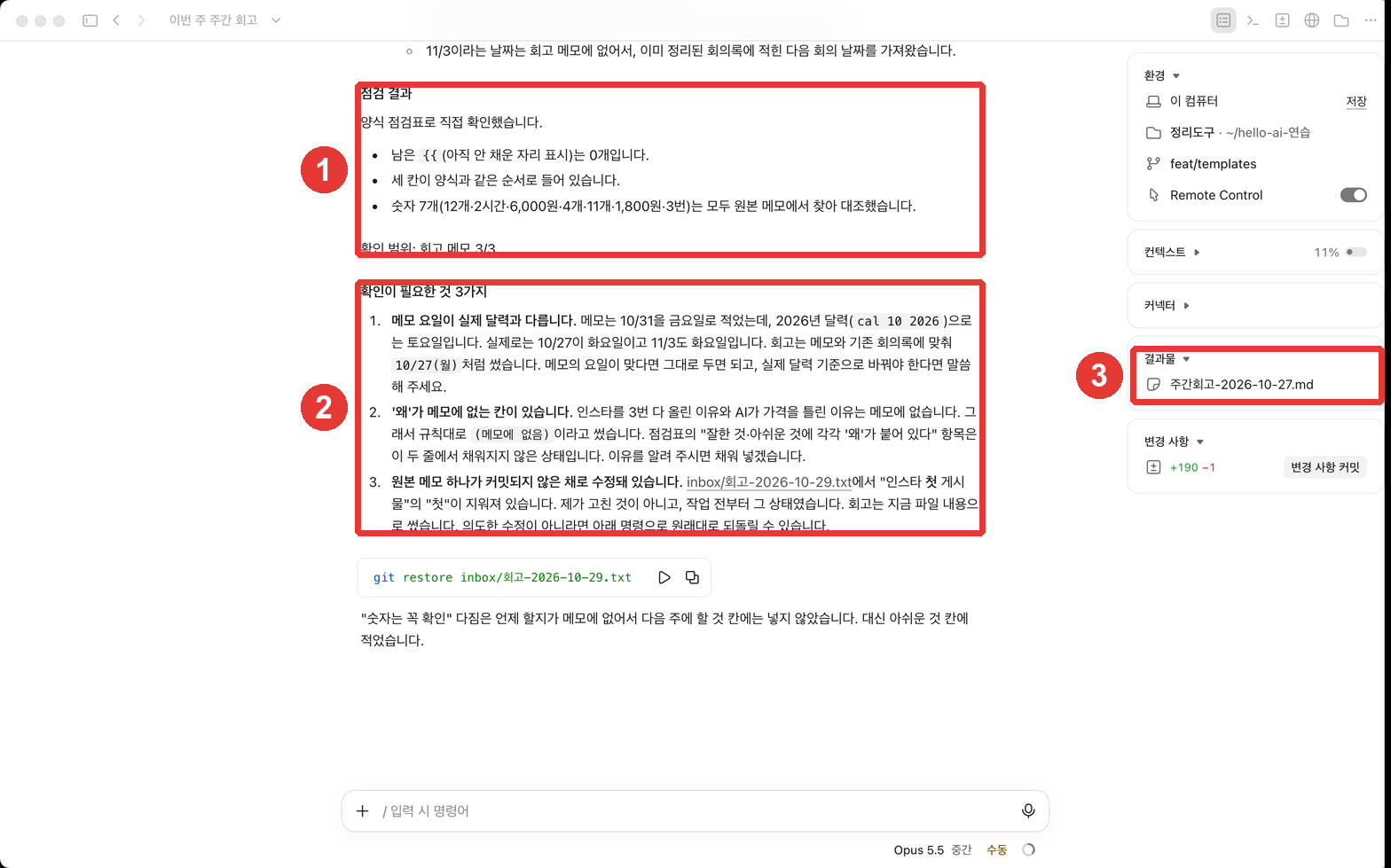
Looking at ①, Claude checked its own work against the checklist in the template guide from Chapter 5. It even stated the scope it checked (3/3 review notes).
In ②, it pointed out three things that need confirmation up front.
- A day of the week in the notes did not match the real calendar (the "made-up date" mentioned in Chapter 2)
- Spots where the notes gave no reason
- An unrecorded edit in an original note[7]
When you write down rules and a checklist, you get the evidence back along with the result.
Quick check
You want to test whether Claude actually follows the rules you wrote in CLAUDE.md. What is the best way?
Rules Are Not Hard Locks
The official docs clearly state that CLAUDE.md is reference context, not enforced configuration.[8] Keep these points in mind when writing it:
- The more important a rule is, the more specific and shorter you should make it. The more specific it is, the more consistently Claude follows it.[8:1]
- If two rules contradict each other, Claude may pick either one at random. Read through your file from time to time and delete outdated rules.[9]
- For things that must never happen under any circumstances (such as deleting your originals folder), do not rely on CLAUDE.md alone. Protect them together with permission modes and Git history from Chapter 4. For example, in "Manual (수동)" mode, Claude asks first before editing files or running commands. If you leave commits, you can go back using those records even when a mistake happens.
You may see a "Status:" line at the end of replies in this chapter's screenshots. That line appears because the computer used for the screenshots has a personal instructions file (~/.claude/CLAUDE.md) that applies to every folder. It is normal if your screen does not show it.[6:1]
There is also a CLAUDE.md that applies to your whole computer
Instructions written in ~/.claude/CLAUDE.md (your user home folder) apply to sessions in every folder.[6:2] The computer used for this guide's screenshots had personal instructions like this, such as adding a "Status:" line at the end of replies, which is why the screen looks slightly different. For rules meant for only one folder, write them in that folder's CLAUDE.md.
Quick check
You wrote "Never edit original files in inbox" in CLAUDE.md. According to the official docs, which explanation is right?
Try It Yourself
- Polish the common rules you wrote in Chapter 4 into 3 to 5 lines. Make them specific enough that you can check "Did it follow this?"
- Ask Claude to create
CLAUDE.mdlike the prompt above, and check its contents in the file pane. - Open a new session and send a short request without mentioning any formatting.
- Check the result against your rules one by one. If Claude missed a rule, rewrite that rule to be more specific.
What's next: Right now, you still type "Organize the meeting notes" or "Make study notes" every time. In Chapter 7, you will turn these requests into skills like /meeting-notes (/meeting-summary) so you can call them with a single command.
Summary
- Every session starts from scratch. Write anything you would otherwise repeat in CLAUDE.md.
- When you see the same mistake or give the same correction a second time, it is time to write it down. Be specific, and keep it under 200 lines.
- A CLAUDE.md at the top of a folder applies to all sessions in that folder;
~/.claude/CLAUDE.mdapplies to all folders. - Test whether Claude follows your rules by sending a short request in a new session.
- It is not a strict lock. Protect critical things together with permission modes and Git history.
Glossary
| Term | One-line meaning |
|---|---|
| CLAUDE.md | An instruction file you write that Claude reads every session |
| Auto memory | Notes Claude writes on its own about your corrections and preferences |
| Project instructions | A CLAUDE.md file that applies to every session in that folder |
| Context | Reference information given to the AI; different from a strict rule |
Finished this chapter?
Progress is saved only in this browser. See your progress on the full table of contents.
Next chapter: Chapter 7. Skills, Plugins, and External Tools
References (9)
Claude Code official docs, "How Claude remembers your project". "Each Claude Code session begins with a fresh context window." / "Claude reads them at the start of every session." code.claude.com (checked on 2026-10-31) ↩︎
Claude Code official docs, "How Claude remembers your project". "Two mechanisms carry knowledge across sessions" / "Auto memory: notes Claude writes itself based on your corrections and preferences" / "Both are loaded at the start of every conversation." code.claude.com (checked on 2026-10-31) ↩︎
Claude Code official docs, "How Claude remembers your project". "Treat CLAUDE.md as the place you write down what you'd otherwise re-explain." / "Claude makes the same mistake a second time" / "You type the same correction or clarification into chat that you typed last session" / "A new teammate would need the same context to be productive" / "If an entry is a multi-step procedure or only matters for one part of the codebase, move it to a skill" code.claude.com (checked on 2026-10-31) ↩︎
Claude Code official docs, "How Claude remembers your project". "Write instructions that are concrete enough to verify" code.claude.com (checked on 2026-10-31) ↩︎
Claude Code official docs, "How Claude remembers your project". "target under 200 lines per CLAUDE.md file. Longer files consume more context and reduce adherence." code.claude.com (checked on 2026-10-31) ↩︎
Claude Code official docs, "How Claude remembers your project". "Personal preferences for all projects" / "Team-shared instructions for the project" / "A project CLAUDE.md can be stored in either ./CLAUDE.md or ./.claude/CLAUDE.md." code.claude.com (checked on 2026-10-31) ↩︎
This edit was one line of an original note that this guide fixed before taking the screenshot. Claude did not do it, so this item may not appear in your own practice run. ↩︎
Claude Code official docs, "How Claude remembers your project". "Claude treats them as context, not enforced configuration." / "The more specific and concise your instructions, the more consistently Claude follows them." code.claude.com (checked on 2026-10-31) ↩︎
Claude Code official docs, "How Claude remembers your project". "if two instructions contradict each other, Claude may pick one arbitrarily." code.claude.com (checked on 2026-10-31) ↩︎