第9章 个人信息与安全——了解我的对话会传到哪里
必读 想跟着这个阶段学下去,一定要读这一章。一句话总结:发给 Claude 的对话会不会被用于 AI 训练,由「Help improve our AI models」这一个开关决定。 删掉的对话,会在30天内从服务器上也被删除。导出、删除账号、举报、危机求助在哪里,本章也一并来看。
界面以2026年10月的网页版为准。设置界面有新旧两种在同时使用,所以菜单的名称和位置,可能因界面而不同。
不该放进去什么,对任何 AI 都一样。已经在第1阶段第9章「不要放进去的东西」里讲过了。本章只看已经放进去的对话,在 Claude 里是怎么处理的。
决定是否用于训练——「Help improve our AI models」
模型训练(model training)是 AI 公司收集人们的对话,用来把下一代 AI 教得更好。在 Claude 里,我的对话被用于训练,大致有三种情况。[1]
第一种可以由我自己决定。这个开关一开始是开着还是关着,我们没能在文档里确认到。所以请你亲自打开看一看。
找到开关的方法
- 点左下角我的名字,打开「设置(설정)」。
- 点左侧菜单里的「隐私(개인정보보호)」。[4]
- 把 ② 「Help improve our AI models」开关打开或关上。即使是韩语界面,这一行也是用英语显示的。[4:1][5]
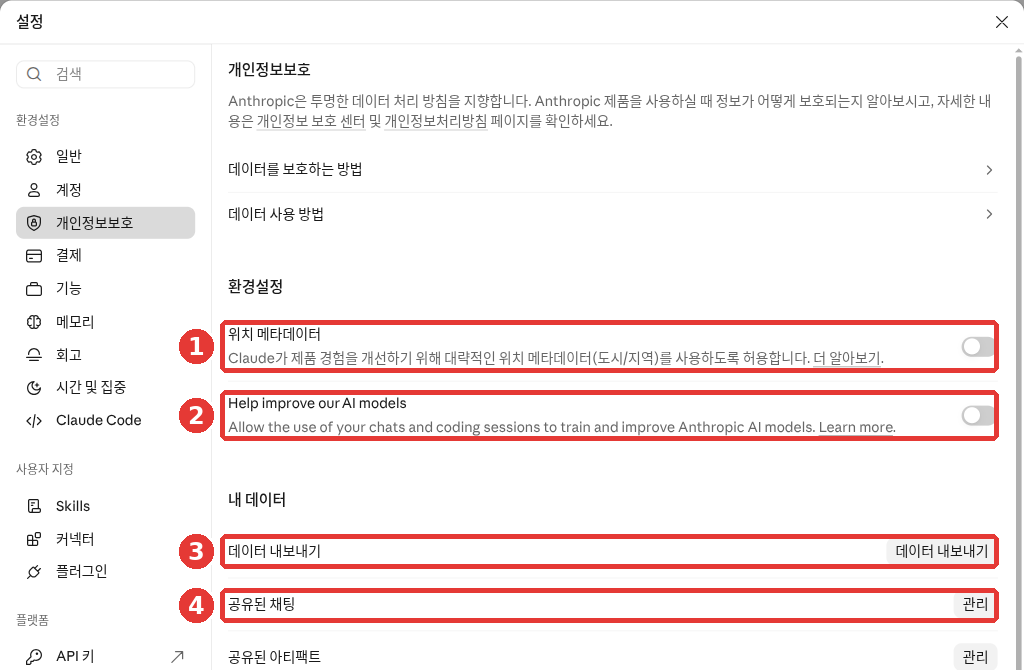
这是免费套餐的界面。红色编号和下面列表里的编号是同一个位置。
- ① 「位置元数据」:决定是否允许使用大致位置(城市、地区)。在下面的「位置是怎么用的」里看。[4:2]
- ② 「Help improve our AI models」:决定是否允许把我的对话用于训练。[4:3]
- ③ 「导出数据」:把我的记录以文件形式拿到手。在下面的「下载我的数据」里看。[4:4]
- ④ 「已分享的聊天」→「管理」:查看我用链接分享出去的对话(第3章)。[4:5]
下面还有「已分享的工件(공유된 아티팩트)」、「已上传的文件(업로드한 파일)」、「我的反馈(내 피드백)」、「记忆设置(메모리 설정)」,每一项都有「管理」按钮。[4:6]
手机应用的顺序也一样。名字 → 「设置」 → 隐私 → 同一个开关。应用里的菜单名称,可能和网页版略有不同。[2:1]
关掉之后有什么变化
- 新对话以后不会再用于训练。
- 以前保存的对话,也会从今后的训练中排除。
- 不过,已经开始的训练和已经做好的模型里,仍然会保留。
- 触发了安全装置的对话,即使关掉开关,也可能被用于与安全有关的改进。[2:2]
开着的话,什么会被用到
可能被用于训练的是整段对话。对话里上传的文件和对话设置也会一起包含进去。另一方面,通过连接器(第7章)连接的 Google Drive 之类的地方,其中的原始资料不会包含在内。 不过,如果你把那些内容直接粘贴到了对话窗口里,就可能被包含进去。[1:1]
用于训练之前,会自动把电子邮件这样的账号信息和对话分离开。[3:1] Anthropic 表示不出售数据,Claude 里也没有广告。[6]
一开始就不想留下的对话
请用隐身聊天(Incognito)。从首页右上角的幽灵形状按钮打开。开始的方法在第3章里。
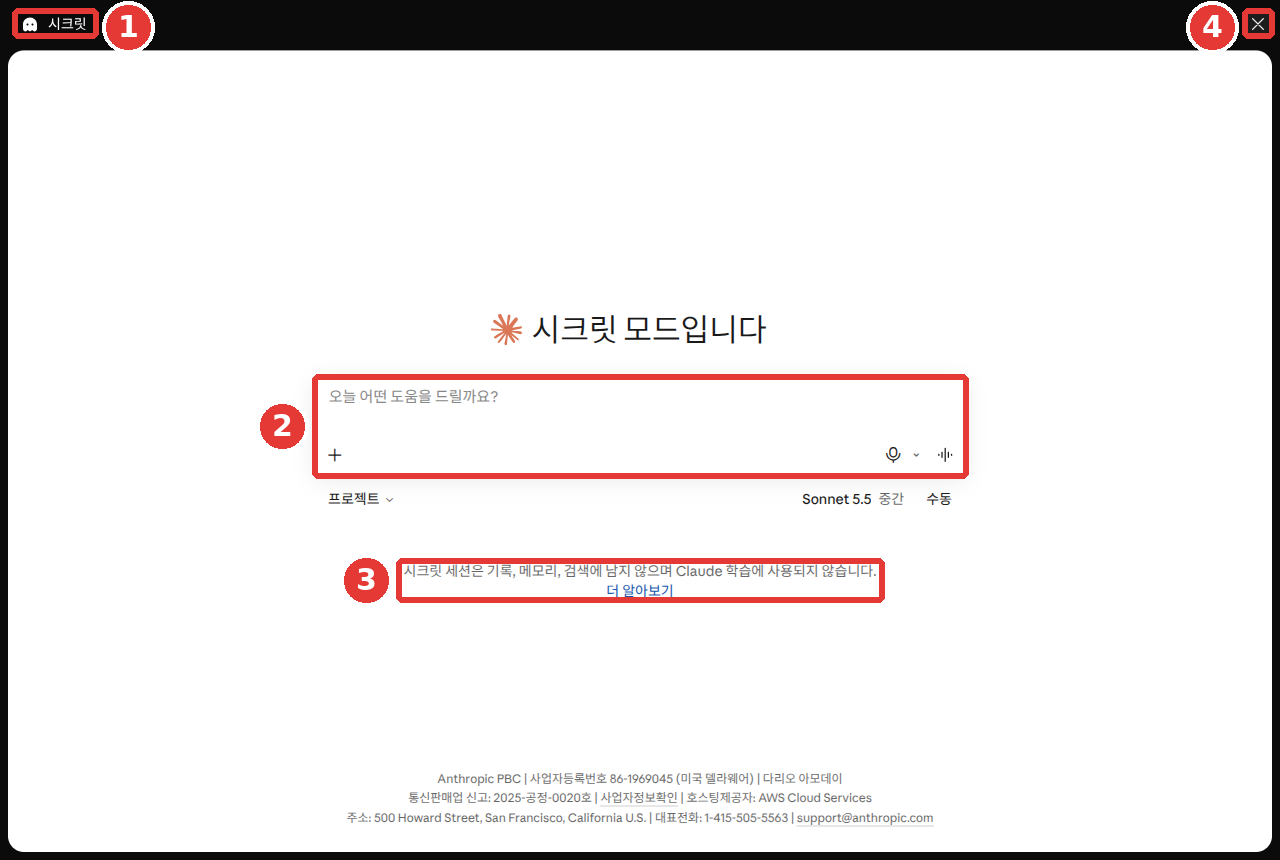
这是免费套餐的界面。③ 说明文字是:"隐身会话不会保留在记录、记忆、搜索里,也不会用于 Claude 的训练。"[4:7] 即使开关开着,隐身聊天也不会用于训练。[1:2] 要结束的话,请点 ④ ✕。
不留在记录里,和不保存在服务器上,是两回事。隐身聊天默认也会在服务器上保存30天。[7]
赞/踩不要随手点。 一旦发送了反馈,那整段对话最多会被保存5年。也可能被用于训练。[8] 如果是聊过敏感内容的对话,最好不要发送反馈,而是选别的办法。
理解检查
你常和家人聊健康方面的事,希望以后我的对话不要用于 AI 训练。该怎么办?
会留多久——保存期限
对话会留多久,因情况而异。[9]
| 情况 | 保留多久 |
|---|---|
| 我删除的对话 | 记录里立刻消失,服务器上在30天内删除 |
| 允许用于训练的对话 | 与我的账号分开后,最多5年 |
| 发送了赞/踩的对话 | 最多5年 |
"与我的账号分开后"是帮助文档中 "de-identified"(去掉识别信息的形态)的译法。[9:1]
看这张表时,有两点要知道。
- 5年的保存期,只适用于打开开关之后新开始,或重新接着聊的对话。
- 删除的对话,以后不会再用于训练。[9:2]
少见的情况——违反规则与依法保留(点击展开)
不想留下的对话,请删掉。删除的对话,以后不会再用于训练。不过,从那段对话里生成的记忆还会留着,所以请到第5章里另外删除。[10] 删除对话的方法,在第3章里看过了。
理解检查
有一段对话你不想留下,也不希望以后用于训练。该做什么?
谁会看到我的对话
默认情况下,Anthropic 的员工看不到我的对话。 例外有两种。一是我把对话作为反馈发送的时候,二是需要审查是否遵守使用规则的时候。审查时,也只是指定的安全团队中的一部分人,按需要的范围去看。数据在传输途中和保存之后,都会被自动加密(变成别人读不了的样子)。[11]
允许用于训练的对话,也只有负责训练工作的少数人才能看到。即便如此,身份证号、银行卡号、健康记录、密码这样特别敏感的信息,也请谨慎放入。[12]
位置是怎么用的
像"附近的好餐厅"这样,用网页搜索去找附近的结果时,Claude 可能会通过互联网连接地址(IP 地址),使用城市、地区这种大致的位置。在这个界面里,「隐私」的 ① 「位置元数据」开关决定这件事。[4:8] 在手机应用里,位置权限在手机设置中管理。不过,为了安全和防止滥用,推测国家、地区这一级别的位置,是关不掉的。[13]
看到不认识的设备时
在「设置」→「账号(계정)」的「活跃会话(활성 세션)」(视界面不同,也叫「已登录的位置(로그인된 위치)」)里,可以看到登录过我账号的设备。表里会显示设备、位置、创建时间、更新时间。[4:9] 看到不认识的设备,请点旁边的「⋮」→「终止(종료)」,马上断开它。[14]
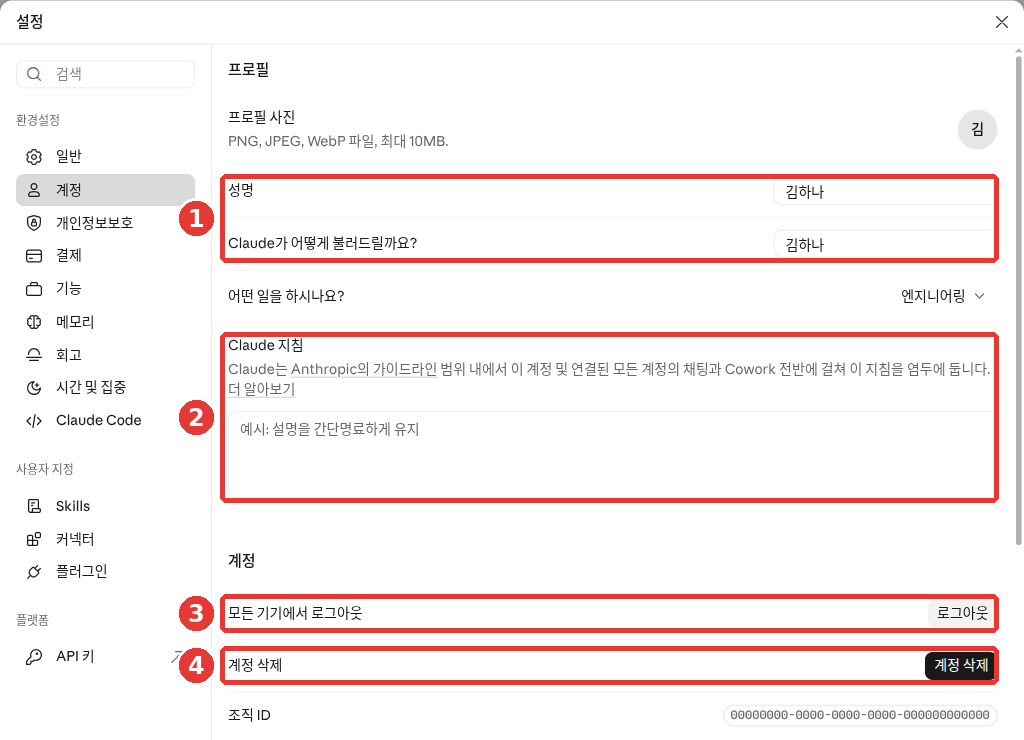
这是免费套餐的界面。「活跃会话」表在图的下方,所以图里没有显示。[4:10] 如果不清楚是哪台设备,也可以用 ③ **「在所有设备上退出登录」**一次性全部断开。[4:11] ① 名字和 ② 指令,在第5章里看。Claude 没有专用的密码(第1章),所以请检查登录用的电子邮件或 Google 账号的安全。详细方法在第3章里。
理解检查
你打算把病历和身份证号码粘贴到对话框里,请它整理。怎么做比较好?
下载我的数据
数据导出(export)是把到目前为止的对话记录和账号信息以文件形式拿到手的功能。在删除账号之前,用它来做备份。Free、Pro、Max 的个人用户都可以用。[15]
- 在网页版或电脑应用里,打开「设置」→「隐私」。[4:12]
- 点上图中 ③ 的「导出数据」按钮。
- 准备好之后,下载链接会发到账号的电子邮箱。
- 在登录状态下点链接下载。
有几点要知道。
- 手机应用里不能导出。 请用网页版或电脑应用。
- 链接在收到后过24小时就会失效。错过了的话,重新申请就行。
- 导出的数据,不能导入到别的个人账号里。[15:1]
下载下来的文件里,装着我所有的对话。不要下载到公用电脑上,也不要传到和别人共用的文件夹里。
公司套餐(Team、Enterprise),要管理员允许,才能导出本人的数据。[15:2]
理解检查
你想在删除账号之前,备份到现在为止的对话。如果平时只用手机应用,该怎么办?
删除账号
删除账号是永久性的。对话、项目、保存的资料都无法再进入,账号也无法恢复。如果有想留下的对话,请先做导出。[16]
如果你在用 Pro、Max,先要取消订阅。 取消订阅,等到目前已付费的期限结束之后再删除。[16:1] 取消订阅在第1章里看过了。
各设备上的删除顺序是这样的。[16:2]
- 网页:左下角名字 →「设置」→「账号」→ 上图的 ④ 「删除账号」[4:13]
- iPhone:「设置」→ 账号项里的「个人资料(프로필)」→「删除账号」→「删除(삭제)」
- 安卓:左上角菜单 → 左下角的首字母 →「个人资料」→「账号操作(계정 작업)」里的「删除账号」→「我同意(동의합니다)」(I Understand)
如果用同一个邮箱建了多个账号,联系客服时必须明确说明要删除哪个账号。[16:3] 如果你是在 Slack 之类的其他服务里使用 Claude 的,就要向那个服务提出删除请求。[17]
理解检查
使用付费(Pro)套餐的人想删除账号。应该先做什么?
AI 出错的时候——错误的回答和假的"已发送"
Claude 也可能给出似是而非却错误的回答。这叫做幻觉(hallucination)。核对的习惯,在第1阶段第9章学过了。在 Claude 里,特别要知道的有三点。[18]
- 看起来很权威的引文,也可能是毫无根据编出来的。
- 不要把 Claude 当作唯一的正确答案来源。 越是重要的建议,越要仔细核对。
- 通过网页搜索得到的回答,请亲自打开 Claude 标注的出处看(第6章)。
"邮件已经发送了"这句话
Claude 说"邮件已经发送了""文件已经传出去了",实际上可能并没有做。没有连接的工具,Claude 是用不了的。可是它有时还是会说自己做了。[19]
所以请这样问问自己:做这件事的工具,我连接了吗?在我的已发送邮件里真的有吗?确认不了的话,一开始就只请它写草稿,会更安全。
请写一封邮件,通知组员明天的会议改到下午3点。
不要发送,请只给我看标题和正文,我复制后自己发。
这样一来,要发什么,最后由我来确认。
理解检查
AI 说“我已经给团队成员发了邮件”。最合适的做法是什么?
安全装置、举报、申诉
Claude 里有过滤有害内容的装置。[20]
- 找出有害内容的模型
- 能拦住回答的过滤器
- 对反复违反规则的人暂时加上的更强的过滤器
帮助文档自己也说明,这些装置并不完美。意思是,它可能拦住正常的提问,也可能漏掉该拦的内容。[20:1]
收到警告或账号被停用的时候
输入被认为违反使用规则时,会收到警告。如果反复违反规则,或者在不支持的地区注册,账号可能会被停用。[21]
认为被错误停用的话,可以提出申诉。
- 用被停用的账号,原样登录 claude.ai。登录之后才能看到表单。
- 在帮助文档里点开表单的「提交申诉(이의 제기 제출)」(Submit an appeal)链接,填写申诉表单。
被停用的 Free、Pro、Max 账号,也可以登录后导出数据或删除账号。不过,能导出的范围可能会缩小。[21:1]
看到有问题的内容时
在别人分享的对话里看到有问题的内容,请点那个界面上的「举报(신고)」按钮。[22]
- 也有另外准备的举报表单。
- 著作权、商标问题要走另外的流程。
- 如果总是提交没有依据的举报,举报的处理可能会被中止。在此之前会先收到警告。[22:1]
理解检查
账号好像被错误地停用了。想提出异议,该怎么做?
难受的时候获得帮助
如果现在身体受伤了,或处在危险的情况里,请不要找 Claude,而是直接联系急救服务。 去最近的急诊室也可以。帮助文档举的例子是美国、加拿大的 911,欧洲许多国家的 112。[23]
如果对话涉及内心的痛苦或自残这样的话题,界面上可能会弹出提供咨询热线和安全计划的横幅。这个横幅不是 Claude 弹出的,而是另外的检测装置弹出的。[23:1]
- 要不要使用横幅,由我自己决定。用或不用,账号都不会有任何不利后果。
- 横幅弹出一次后,约2小时内不会再弹出。
- 随时都可以在 claude.findahelpline.com 找到咨询机构。它会按我所在的位置,挑选并显示合适的机构。
- Anthropic 不会把我的对话发送给咨询机构。[23:2]
横幅里,可能还会同时出现非营利组织 Koko 的安全计划工具。这是一个一起制定难受时拿出来看的简短计划的工具。大约需要5分钟,免费,也不需要透露姓名。[23:3]
如果一个人扛不住,先从对某个人说出来开始,也没关系。
理解检查
朋友和 Claude 聊起痛苦的事,看到了心理援助热线横幅。他担心点了会有不良后果。你会怎么跟他说?
亲自动手试试
1. 确认我的训练设置
打开「设置」→「隐私」,看看 ② 「Help improve our AI models」是不是开着。改成你想要的状态之后,如果有手机应用,也在应用里确认是同一个值。
2. 看看登录过的设备
打开「设置」→「账号」往下拉,看「活跃会话」(或「已登录的位置」)。都是我认识的设备吗?有不认识的,就马上终止。
3. 请 Claude 给我一份我的检查清单
我在用个人账号使用 Claude。
我想确认我的对话是否被用于训练,并整理掉不需要的对话。
请把需要我在设置界面里亲自确认的项目,做成检查清单(☐)。
不确定的菜单名称不要编造,请写"在界面上确认"。
把收到的清单和本章对照一下。如果菜单名称不同,以我界面上看到的名称为准。
连续任务(筹备读书会):确认「设置」→「隐私」里的「Help improve our AI models」是什么状态。如果要把真实的聚会资料上传到「读书会」项目,想一想这个设置要怎么放。
小结
- 是否用于训练,在「设置」→「隐私」→「Help improve our AI models」里决定。一开始的值,要亲自打开确认。
- 关掉之后,已经做好的模型里仍会保留,触发安全装置的对话也可能被用到。
- 隐身聊天不会用于训练。发送了赞/踩,那段对话最多会保留5年。
- 删除的对话会在30天内从服务器上也被删除。允许用于训练的对话最多可能保留5年。
- 员工默认看不到对话。不认识的设备,在「活跃会话」里断开。
- 导出只能在网页版、电脑应用里做,链接24小时后失效。删除账号无法撤销,付费订阅要先取消。
- "已发送"这句话要亲自确认。被错误停用的话,登录后提出申诉。
- 遇到危险的情况,先联系急救服务。咨询机构到 claude.findahelpline.com 去找。
术语解释
| 术语 | 中文名称 | 一句话解释 |
|---|---|---|
| Model training | 模型训练 | 用收集到的对话来教下一代 AI |
| Model improvement | 模型改进 | 决定是否允许把我的对话用于训练的设置 |
| Incognito | 隐身聊天 | 不进记录、也不用于训练的对话 |
| Feedback | 反馈 | 用赞/踩告诉它回答好不好 |
| Retention | 保留 | 数据不删除、留存的期限 |
| Encryption | 加密 | 把数据变成别人读不了的样子 |
| IP address | IP 地址 | 接入互联网的设备的地址。可以得知大致的地区 |
| Export | 导出 | 把我的全部记录以文件形式拿到手 |
| Session | 会话 | 在一台设备上保持登录的状态 |
| Hallucination | 幻觉 | AI 编造似是而非的错误说法 |
| Appeal | 申诉 | 请求重新审查被错误停用的情况 |
| Helpline | 咨询热线 | 难受的时候,可以和受过训练的人聊一聊的地方 |
这一章读完了吗?
学习记录只保存在这个浏览器中。整体进度可以在 全部目录中查看。
下一章:第10章. 语音与手机
参考资料(23 条)
Anthropic 隐私中心,「Is my data used for model training?」。"You choose to allow us to use your chats and coding sessions to improve Claude, learn more here" / "It does not include raw content from connectors (e.g. Google Drive), including remote and local MCP servers, though data may be included if it’s directly copied into your conversation with Claude." / "Your Incognito chats are not used to improve Claude, even if you have enabled Model Improvement in your Privacy Settings." privacy.claude.com (确认日期 2026-10-26) ↩︎
Anthropic 隐私中心,「How do I change my model improvement privacy settings?」。"Under Help Improve our AI models, click the button to toggle it off/on" / "we will stop using your previously stored chats and coding sessions in future model training runs." / "Your data will still be included in model training that has already started and in models that have already been trained" / "If our safety classifiers flag your conversations, they may still be used to improve our internal trust and safety models" privacy.claude.com (确认日期 2026-10-26) ↩︎
Anthropic 隐私中心,「How Do You Use Personal Data in Model Training?」。"You’ve explicitly provided materials to us (e.g.via our thumbs up/down feedback button), or" / "we will automatically de-link them from your user ID (e.g. email address) before it’s used by Anthropic." privacy.claude.com (确认日期 2026-10-26) ↩︎
在 Claude 网页界面(免费套餐,韩语)上亲自确认。"Help improve our AI models — Allow the use of your chats and coding sessions to train and improve Anthropic AI models." / "시크릿 세션은 기록, 메모리, 검색에 남지 않으며 Claude 학습에 사용되지 않습니다." (确认日期 2026-10-26) ↩︎
韩语帮助里把它称为「AI 모델 개선 지원」(帮助改进 AI 模型)。 ↩︎
Anthropic 隐私中心,「Updates to our Privacy Policy」。"We don’t sell your data, Claude remains ad-free, and you can control whether your conversations are used to improve Anthropic’s AI models." privacy.claude.com (确认日期 2026-10-26) ↩︎
Anthropic 帮助,「Use incognito chats」。"While incognito chats aren't saved to your chat history, they are retained for either 30 days (default), or longer in accordance with your organization's custom data retention setting (available for Enterprise plans)." support.claude.com (确认日期 2026-10-26) ↩︎
Anthropic 隐私中心,「Is my data used for model training?」。"we will store the entire related conversation, including any content, custom styles or conversation preferences, in our secured back-end for up to 5 years." privacy.claude.com (确认日期 2026-10-26) ↩︎
Anthropic 隐私中心,「How long do you store my data?」。"Deleted from our back-end storage systems within 30 days" / "we may retain your data in a de-identified format for up to 5 years in our model training pipelines." / "This retention period only applies to new or resumed chats after the model training setting has been enabled." / "Additionally, if you delete a chat from your chat history, it will not be used to train future models." / "We retain inputs and outputs for up to 2 years and trust and safety classification scores for up to 7 years" / "In all cases, we may retain chats and coding sessions as required by law, to resolve disputes, or as necessary to combat violations of our Usage Policy." privacy.claude.com (确认日期 2026-10-26) ↩︎
Anthropic 帮助,「Use Claude’s chat search and memory to build on previous context」。"When a conversation is deleted, including under a retention period, memory entries generated from it aren’t removed, but you can delete individual memories while memory is on." support.claude.com (确认日期 2026-10-26) ↩︎
Anthropic 隐私中心,「How does Anthropic protect the personal data of Claude users?」。"Limited Access: By default, Anthropic employees cannot access your conversations unless:" / "Encryption: Your data is automatically encrypted both while in transit, and stored (at rest)." privacy.claude.com (确认日期 2026-10-26) ↩︎
Anthropic 帮助,「I would like to input sensitive data into my chats with Claude. Who can view my conversations?」。"Access is limited to a small number of personnel involved in model training." / "we also recommend being thoughtful about sharing highly sensitive personal details such as:" support.claude.com (确认日期 2026-10-26) ↩︎
Anthropic 隐私中心,「Does Claude use my location?」。"Claude may use your IP address to determine coarse-grained location (city/region level)." / "Claude's access to location data for non-web surfaces (e.g. the mobile app and browser extension) are managed at the device level." / "This use is necessary to protect our users and business and cannot be toggled off." privacy.claude.com (确认日期 2026-10-26) ↩︎
Anthropic 帮助,「Managing your active sessions」。"Scroll to the Active sessions section (called Where you're logged in in the updated Settings layout)." / "terminate it right away and consider changing your password." support.claude.com (确认日期 2026-10-26) ↩︎
Anthropic 帮助,「Export your Claude data」。"Data exports are available to individual Claude users on Free, Pro, and Max plans." / "It's not possible to run an export from Claude for iOS or Android." / "You must be signed in to your account to download your data using this link." / "The download link will expire 24 hours after delivery." / "Exported data can't be imported into another personal Claude account, and we don't support migrating data between personal accounts." / "you can export your own data once an organization Owner or Primary Owner turn this on." support.claude.com (确认日期 2026-10-26) ↩︎
Anthropic 帮助,「Delete your Claude account」。"You'll lose access to your conversations, projects, and other saved data, and you can't recover the account afterward." / "Wait until the end of your current subscription period." / "If you have multiple accounts associated with the same email address, you'll need to specify which accounts you want to delete when you contact us." support.claude.com (确认日期 2026-10-26) ↩︎
Anthropic 隐私中心,「Deleting Claude accounts」。"you will need to request account deletion through that third party service provider." privacy.claude.com (确认日期 2026-10-26) ↩︎
Anthropic 帮助,「Claude is providing incorrect or misleading responses. What’s going on?」。"Claude can display quotes that may look authoritative or sound convincing, but are not grounded in fact." / "Users should not rely on Claude as a singular source of truth and should carefully scrutinize any high-stakes advice given by Claude." / "When working with web search results, users should review Claude's cited sources." support.claude.com (确认日期 2026-10-26) ↩︎
Anthropic 帮助,「Claude is producing links that don’t work and falsely claiming that it has sent emails or produced external documents. What’s going on?」。"Even if it claims otherwise, Claude does not have access to other tools or software that are not explicitly integrated, including email, word processors, or file transfers." support.claude.com (确认日期 2026-10-26) ↩︎
Anthropic 帮助,「Our Approach to User Safety」。"We may temporarily apply enhanced safety filters to users who repeatedly violate our policies" / "These features are not failsafe, and we may make mistakes through false positives or false negatives." support.claude.com (确认日期 2026-10-26) ↩︎
Anthropic 帮助,「Safeguards warnings and appeals」。"we warn users if we believe their prompts are violating our Usage Policy." / "Account creation from an unsupported location" / "If you feel your account has been wrongly suspended or terminated, please go to claude.ai, log in with your banned account, and fill out the appeal form linked below." / "Important: You must be logged in to access the appeal form." / "you can still log in at claude.ai to export your data or delete your account." support.claude.com (确认日期 2026-10-26) ↩︎
Anthropic 帮助,「Report, block, and remove content from Claude」。"Use the “report” button on the shared content." / "If you believe content violates Anthropic’s usage policies or local laws and should be removed or restricted, you can report it through this form." / "We will provide a warning before suspension." support.claude.com (确认日期 2026-10-26) ↩︎
Anthropic 帮助,「Crisis Helpline Support in Claude」。"please contact emergency services (such as 911 in the US and Canada, or 112 in much of Europe) or go to your nearest emergency room." / "This banner is surfaced by a separate detection system, not from Claude directly." / "there are no consequences for your account based on your decision to access resources." / "After you see the banner, it won’t appear again for about two hours" / "The resources shown are selected based on your location to provide relevant, local support options." / "Anthropic doesn’t send your conversations to helplines or to Koko." / "It takes about five minutes. You’re guided one step at a time, and you decide what goes in it." support.claude.com (确认日期 2026-10-26) ↩︎