Chapter 3. The Rules File AGENTS.md — Moving CLAUDE.md to Codex
Required Read this to follow this stage.In short: Codex reads
AGENTS.mdbefore starting any work. If you leave Claude Code'sCLAUDE.mdas is, Codex does not read it. You will move the rules in the note-organizer folder intoAGENTS.mdand test in a new chat whether Codex follows them without being told.
This chapter is based on the official Codex documentation checked on November 1, 2026, and on what this guide tested directly in the note-organizer folder. Why you need a rules file was already explained in Claude Code Chapter 6. Here, we cover only what changes in Codex.
Codex Does Not Read CLAUDE.md
The rules file in Codex is named AGENTS.md.[1] To use a file with a different name as rules, you have to register it separately in settings; unregistered file names are ignored.[2] So if you leave CLAUDE.md as is, Codex will not read it as rules.
You could also see this in the run log from Chapter 2. Codex looked for AGENTS.md in the folder, found none, and read only the templates (templates/). It did not open CLAUDE.md.
Even so, the meeting notes in Chapter 2 followed the (메모에 없음) (Not in notes) rule. That is because the same rule was also written in the template guide (templates/README.md). Put the other way around, Codex does not know any rule written only in CLAUDE.md.
Quick check
Even without AGENTS.md, Codex followed the '(not in note)' rule. In this guide's hands-on practice, why did that happen?
Moving CLAUDE.md to AGENTS.md
You can leave the moving job to Codex too. Like Chapter 2, the run in this chapter uses the same Codex in the terminal. This time, we added one new rule. When you check later whether this rule is followed, you can tell fairly reliably whether Codex read AGENTS.md.
CLAUDE.md is the rules file that Claude Code reads. Move the same rules into AGENTS.md so Codex reads them too. Do not change the rule contents, and add just one rule: 'At the very bottom of the organized file, include a "Check Against Original (원본과 대조할 것)" section and list up to 3 numbers, names, or dates to double-check.' Leave CLAUDE.md as is.Codex copied the five rules from CLAUDE.md as they were and added the new rule as number 6. Then it reported that it verified the contents matched the original completely, except for the added rule.
Result: AGENTS.md
There is a reason we did not delete CLAUDE.md. We want to keep using the same folder in Claude Code as well. In return, you have to update both files together. If you edit only one, the two tools will work under different rules.
Quick check
To use the same folder in both Claude Code and Codex, you created AGENTS.md and also kept CLAUDE.md. What should you keep in mind going forward?
Testing Without Mentioning the Rules
Open a new chat and ask Codex to organize your study notes without saying anything about the rules.
Organize inbox/study-2026-10-28-prompt-lecture.txt into study notes and save it in notes/.At the very bottom of the result, the section from the new rule appeared.
## Check Against Original (원본과 대조할 것)

- Lecture date: 10/28 (Wed). The original says 10/28, and the year 2026 was taken from the file name.
- Lecture length: 1 hour.
- Prompt-writing methods introduced by the instructor: 5.
Result: Study notes written from rules alone
| When the file was made | "Check Against Original (원본과 대조할 것)" section |
|---|---|
| Before AGENTS.md (Chapter 2 meeting notes) | None |
| After AGENTS.md (these study notes) | Present |
Source: Hands-on results from this guide (2026-11-01, 1 run each)
Because the new rule existed only in AGENTS.md, we can see that Codex read and followed that file. There is no guarantee it will follow the rules every single time, so check the result each time you view it.
Limits of this experiment (click to expand)
- This was tested once each.
- The note types before and after (meeting notes vs. study notes) were different.
- The template checklist also has a similar item: "Checked once against the original note."
To be more certain, try running the same note once without AGENTS.md and once with it, then compare.
Quick check
You want to check whether AGENTS.md is really being read. What method did this guide use?
The Order Codex Reads AGENTS.md
You can place AGENTS.md in two locations.[3]
| Location | Scope | Example |
|---|---|---|
~/.codex/AGENTS.md | All of my folders | "Answer in Korean" |
AGENTS.md in a project folder | That folder only | Note-organizer rules |
Source: Codex official docs (selected)[3:1]
If both exist, Codex reads them joined together as one. The file closer to your current folder is added later, and later instructions take priority over earlier ones.[4]
For example, say ~/.codex/AGENTS.md says "Answer in Korean" and the organizer folder's AGENTS.md says "Answer in English." The organizer folder's file is added later, so in this folder "in English" wins.
There is a limit to how much can be joined. Once the combined size reaches the default of 32 KiB (kibibytes, a unit of file size), Codex stops adding more.[5] In Korean, that is roughly 10,000 characters. Keep your rules short.
If you edited the rules and they do not seem to take effect, start a new chat or restart Codex. Codex reads the rules fresh each time it starts a run.[6]
If a folder does not have AGENTS.md yet, you can also type /init in the app's input box to create an outline.[7]
Quick check
Your ~/.codex/AGENTS.md file and your organizer folder's AGENTS.md say different things. Which one takes priority?
Import and Memories
There is also a feature that does what you did by hand in this chapter all at once. Import is a feature that brings over settings from another agent all at once. In the app, you can import from Claude Code, Claude Cowork, or Cursor.[8] Start from the Import menu in the app settings.[9]
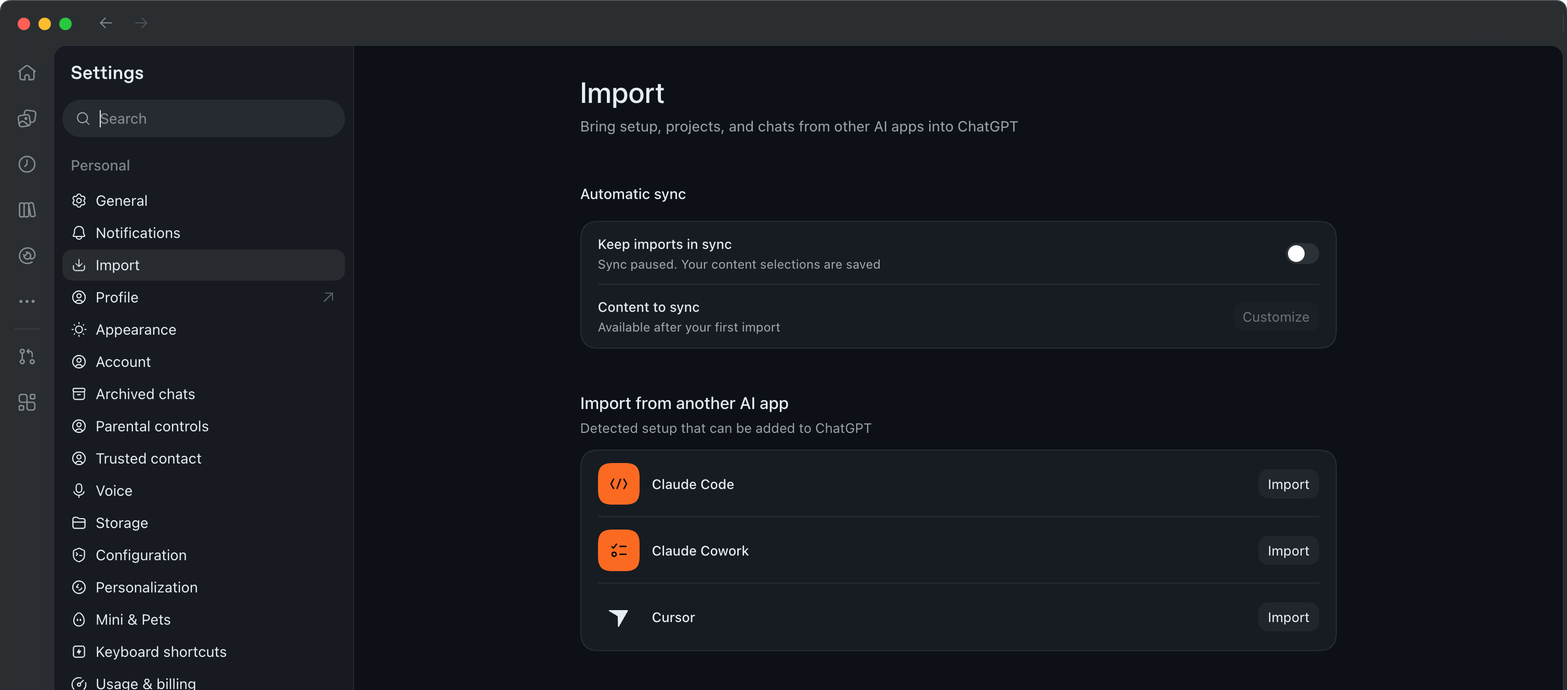
On this guide's screen (2026-11-01), Import was in the left list of settings, and Claude Code, Claude Cowork, and Cursor found on this computer appeared with an Import button next to each. This guide did not click the button.
This guide did not run Import. Import looks through not just a single folder, but also your personal settings on your computer.[10] It then converts your rules files, skills, slash commands, and settings files into their Codex counterparts and moves them all at once. For example, CLAUDE.md becomes AGENTS.md.[11] Because a lot gets moved at once, if you want to see for yourself what gets moved one by one, it is better to move things by hand as we did in this chapter.
What Import moves and what to review (click to expand)
| In Claude Code | In Codex |
|---|---|
Rules files (CLAUDE.md, etc.) | AGENTS.md |
| Skills | Skills |
Slash commands (/name) | Skills ($name) |
settings.json | config.toml |
Source: Codex official docs (selected)[11:1]
settings.json and config.toml are files that hold each tool's settings. Only the names differ; they do the same job.
Importing does not change or delete your original settings.[12] However, after importing, the docs strongly recommend reviewing these things.[13]
- Parts that limit which tools or permissions a skill can use
- Hooks (scripts that run automatically at set times)
- Commands you use by filling in a blank with a value (commands that take arguments)
If you do not see the Import menu in settings, open General and look for Import other agent setup.[9:1]
Memories is a feature that carries context from earlier work into future work.[14] Local Codex memories on your computer are turned off by default.[15] The official docs say to treat memories only as a "recall helper" and not to rely on them for rules that must always be followed.[16] Write rules that must be followed in AGENTS.md.[17]
Quick check
Where do the official docs recommend putting organizing rules that must always be followed?
Try It Yourself
- Use the prompt above to have Codex move
CLAUDE.mdtoAGENTS.md. Add one new rule along with it. - Open
AGENTS.mdand check that the original rules are intact and the new rule is attached. - Open a new chat and have Codex organize the study notes without mentioning the rules.
- Check the result to see if the new rule was followed.
Up next: In Chapter 4, you will learn about the permissions menu—which decides what Codex does on its own and what it asks you about—and how to undo changes.
Summary
- Codex reads
AGENTS.md, and does not readCLAUDE.mdif you leave it as is. - If you use both tools together, update both files together.
- By adding a new rule and testing without mentioning it, you can tell whether the rules file is being read (this exercise: 0 before → 1 after).
- Personal rules go in
~/.codex/AGENTS.md, and folder rules go in the folder'sAGENTS.md. The closer file takes priority. - Import moves settings all at once, but also inspects your personal settings. Put rules that must be followed in
AGENTS.md, not in Memories.
Glossary
| Term | One-line meaning |
|---|---|
| Import | A feature that moves settings from another agent into Codex |
| Memories | A feature that recalls context from earlier work next time |
/init | A command that creates an AGENTS.md outline |
Finished this chapter?
Progress is saved only in this browser. See your progress on the full table of contents.
Next chapter: Chapter 4. Permissions and Undo
References (17)
Codex official docs, "Custom instructions with AGENTS.md". "Codex reads
AGENTS.mdfiles before doing any work." learn.chatgpt.com (checked on 2026-11-01) ↩︎Codex official docs, "Custom instructions with AGENTS.md". "Filenames not on this list are ignored for instruction discovery." learn.chatgpt.com (checked on 2026-11-01) ↩︎
Codex official docs, "Custom instructions with AGENTS.md". "In your Codex home directory (defaults to
~/.codex, unless you setCODEX_HOME), Codex readsAGENTS.override.mdif it exists." / "Starting at the project root (typically the Git root), Codex walks down to your current working directory." learn.chatgpt.com (checked on 2026-11-01) ↩︎Codex official docs, "Custom instructions with AGENTS.md". "Files closer to your current directory override earlier guidance because they appear later in the combined prompt." learn.chatgpt.com (checked on 2026-11-01) ↩︎
Codex official docs, "Custom instructions with AGENTS.md". "Codex skips empty files and stops adding files once the combined size reaches the limit defined by
project_doc_max_bytes(32 KiB by default)." learn.chatgpt.com (checked on 2026-11-01) ↩︎Codex official docs, "Custom instructions with AGENTS.md". "If instructions look stale, restart Codex in the target directory." learn.chatgpt.com (checked on 2026-11-01) ↩︎
Codex official docs, "Slash commands". "Generate an
AGENTS.mdscaffold for the current project." learn.chatgpt.com (checked on 2026-11-01) ↩︎Codex official docs, "Import from another agent". "The desktop app can import from Claude Code, Claude Cowork, or Cursor." learn.chatgpt.com (checked on 2026-11-01) ↩︎
Codex official docs, "Import from another agent". "If Import isn't available as a settings section yet, open General and find Import other agent setup." learn.chatgpt.com (checked on 2026-11-01) ↩︎
Codex official docs, "Import from another agent". "The import flow checks both your user-level setup and your existing projects." learn.chatgpt.com (checked on 2026-11-01) ↩︎
Codex official docs, "Import from another agent". Instruction files,
settings.json, Skills, and Slash commands rows in the "What ChatGPT can import" table. learn.chatgpt.com (checked on 2026-11-01) ↩︎Codex official docs, "Import from another agent". "Importing doesn't change or delete your existing agent setup." learn.chatgpt.com (checked on 2026-11-01) ↩︎
Codex official docs, "Import from another agent". "Tool restrictions or permissions in imported skills and agents." / "Hooks whose behavior may differ after import." / "Prompt templates or command-style prompts that depend on arguments, shell interpolation, or file-path placeholders." learn.chatgpt.com (checked on 2026-11-01) ↩︎
Codex official docs, "Memories". "Memories let ChatGPT and Codex carry useful context from earlier work into future work." learn.chatgpt.com (checked on 2026-11-01) ↩︎
Codex official docs, "Memories". "Local Codex memories are off by default." learn.chatgpt.com (checked on 2026-11-01) ↩︎
Codex official docs, "Memories". "Treat memories as a helpful recall layer, not as the only source for rules that must always apply." learn.chatgpt.com (checked on 2026-11-01) ↩︎
Codex official docs, "Memories". "Keep required team guidance in
AGENTS.mdor checked-in documentation." learn.chatgpt.com (checked on 2026-11-01) ↩︎